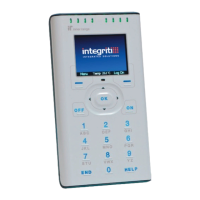
Need help?
Do you have a question about the Inner Range CONCEPT IQ and is the answer not in the manual?
Details the roles and permissions of Installer, Master, and Normal users, including PIN code configurations.
Step-by-step guide to arming and disarming a single-area system using PIN codes.
Procedure for arming and disarming multiple areas in a multi-area configuration.
How to arm and disarm specific areas within a multi-area system.
Procedure for temporarily disabling specific zone inputs (e.g., for maintenance).
How to activate emergency alarms like Panic, Fire, and Medical by pressing specific key combinations.
How to use a duress PIN code to trigger a silent alarm report to the monitoring station.
How to access different operational modes using master PIN codes and mode numbers.
Procedure for adding new users or modifying existing user settings, including PIN and area assignments.
Steps to remove user accounts and their associated data from the system.
How to put the system into zone walk test mode for testing detectors and their responses.
 General
| Zones | Up to 256 |
|---|---|
| Connectivity | Ethernet, RS-485 |
| Mobile Access | Yes, via mobile app |
| Integration | CCTV, Access Control |
| Power Supply | 24VDC |

 To Next Page