15
Version 2.02 December-2002
1. Logon.
Enter your PIN code; ...
2. Select the first User number to be added or changed.
Press , , , . Where is the User number (User 02 to User 47).
The <A1> Lamp will flash to indicate the system is ready for the PIN Code or optional Wireless
Remote Key/Access Card entry.
If a PIN code is already programmed for this User, the corresponding number of Zone Lamps (4 or 6)
will be flashing.
3. Enrol the User’s Wireless Remote Key. (Optional)
Present the Card at any Access Reader in the system within 30 seconds of selecting the User
number.
Three short beeps will sound to confirm that the Keyfob/Card has been enrolled and assigned to the
selected User.
If the Keyfob/Card is already assigned to another User, or is not recognised by the system, one long
beep will sound to indicate a problem.
4. Enter the new PIN Code.
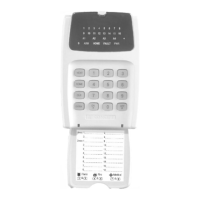
A Zone Lamp (1 to 4, OR 1 to 6) will Fast flash to indicate which digit of the PIN code is to be
entered.
If the Zone Lamp flashes Slowly, it indicates that a PIN Code is already programmed for this User.
If you enter a new PIN number it will replace the existing PIN number.
As each digit is entered, a chirp will sound to indicate that the entry is accepted, and the next Zone
Lamp will now Fast flash for the next digit to be entered.
Enter the new PIN number ... (4 or 6 digits), then press
When complete: Three short beeps will sound to confirm the new PIN no. has been programmed.
If the PIN is rejected, one long beep will sound to indicate a problem.
5. Assign or Change the User Area or Areas. (Only required if you have a Multi-Area System)
The <A2> Lamp will flash to indicate the system is ready for the Area assignment entry.
The corresponding Zone Lamps (1 to 4) will indicate the Area/s selected.
4.1 ADDING OR CHANGING USERS. NEXT 4xx
ADD / DELETE USERS


 To Next Page