English
4
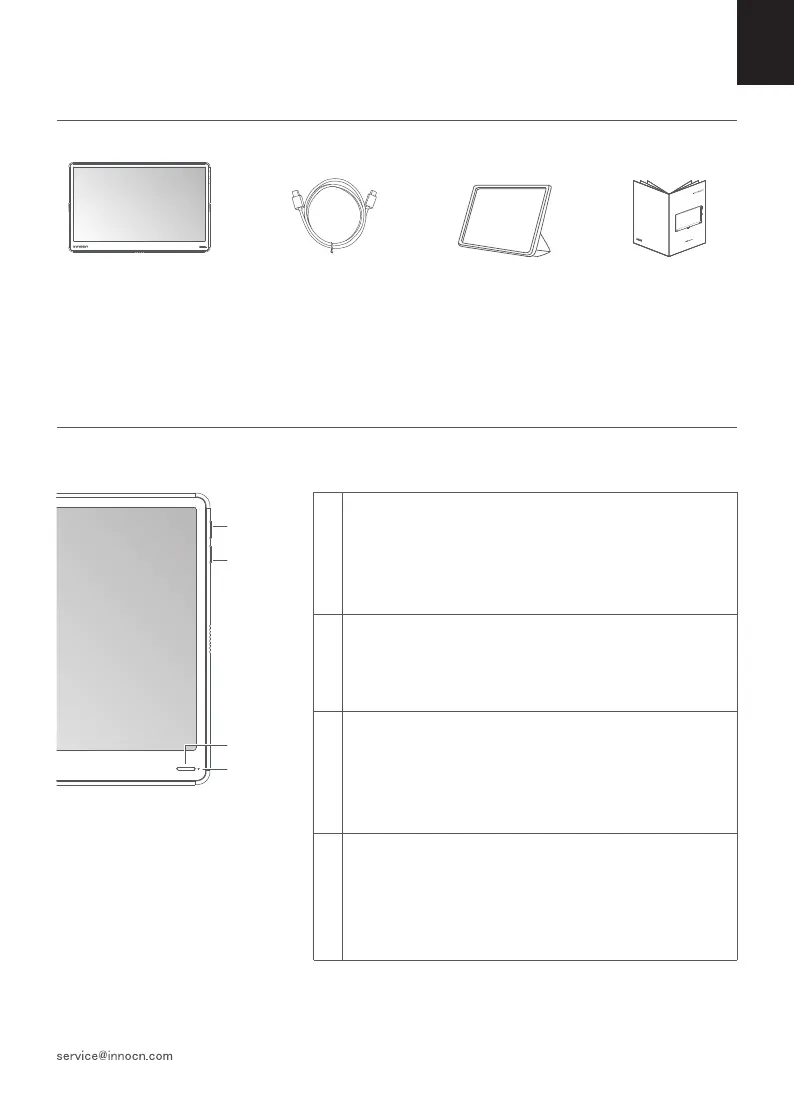
Packaging List
Product Instruction
Key Instruction
1
2
3
4
Power Button:
Press the button for 3 seconds to switch it on or off.
Press the up and down keys to show the volume shortcut.
Press the Power key to exit.
Press the Power key to adjust the menu.
LED Indicator:
The blue indicator is on when there is a signal. The red
indicator (orange indicator) is on when there is no signal. The
indicators are off after shutdown.
Up key:
When there is osd, select the function to the left or turn up the
progress bar.
When there is no osd, display the volume shortcut, then press
to turn up the progress bar.
Down key:
When there is osd, select the function to the right or turn up
the progress bar
When there is no osd, display the volume shortcut, and then
press to turn down the progress bar.
Type-C data cable x1
Quick Start Guide
N2F
快速安装指南
便携显示器
Protective sleeve x1
Monitor x1
Up key
Down key
LED Indicator
Power Button



 To Next Page