B
A
D
C
A
B B C
A
B
C
A
B
C
D
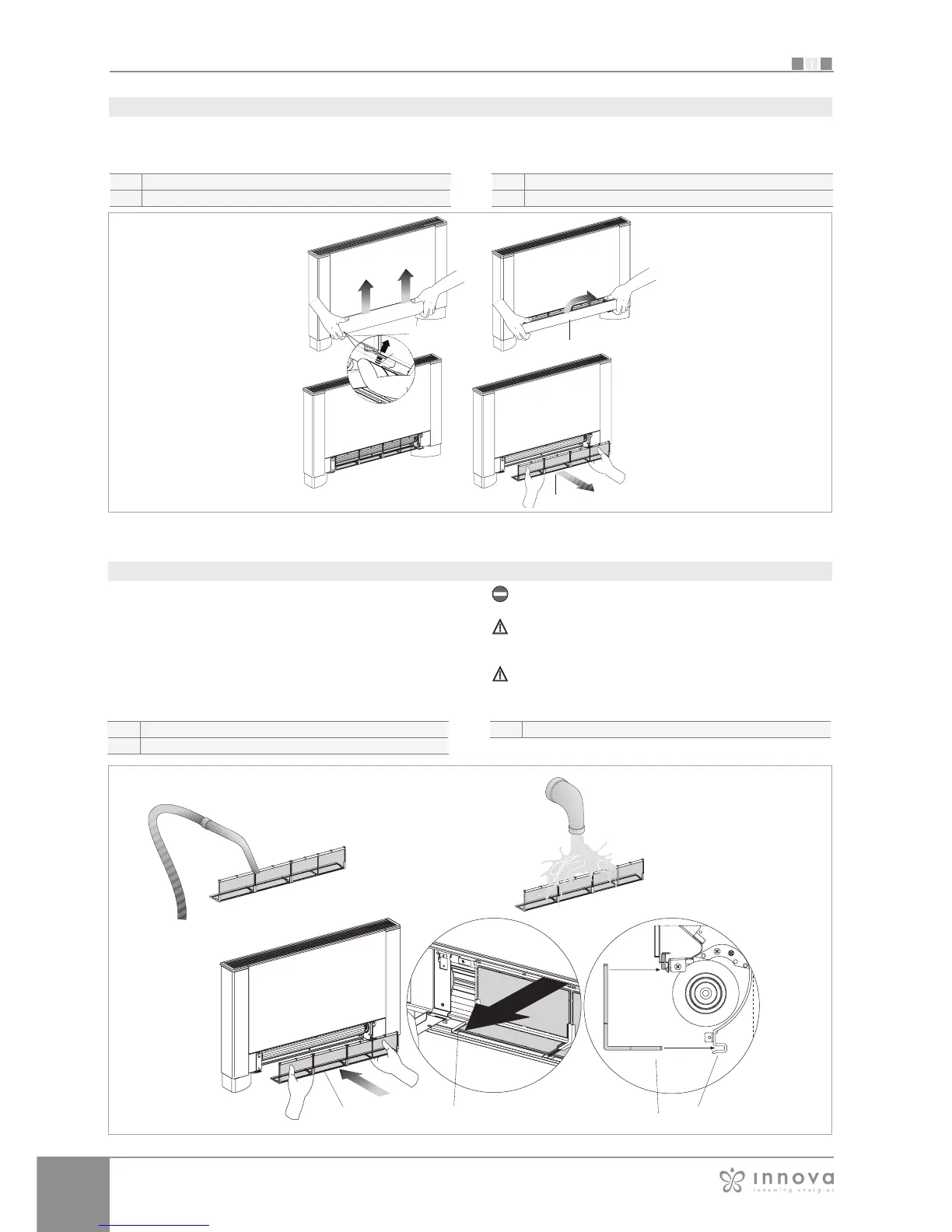
- Pass hand underneath the far side of the mobile panel
- Press the plastic tabs
- Lift and extract the mobile panel
- Extract the filter.
Removal of filtering cells in versions with mobile panel suction.
Mobile panel
Plastic tabs
Filter
Filter extraction
- Remove dust from the filter with a vacuum cleaner
- Wash the filter under running water without using
detergents or solvents, and leave to dry.
- Replace the filter on the fan coil, paying particular
attention to insert the lower edge in its housing.
Do not use the device without the mesh filter.
The device is fitted with a safety switch that prevents
fan operation without the mobile panel in place.
After filter cleaning, check that the panel is properly
mounted.
Cleaning the filters
Filter
Lower edge
Filter housing









 To Next Page