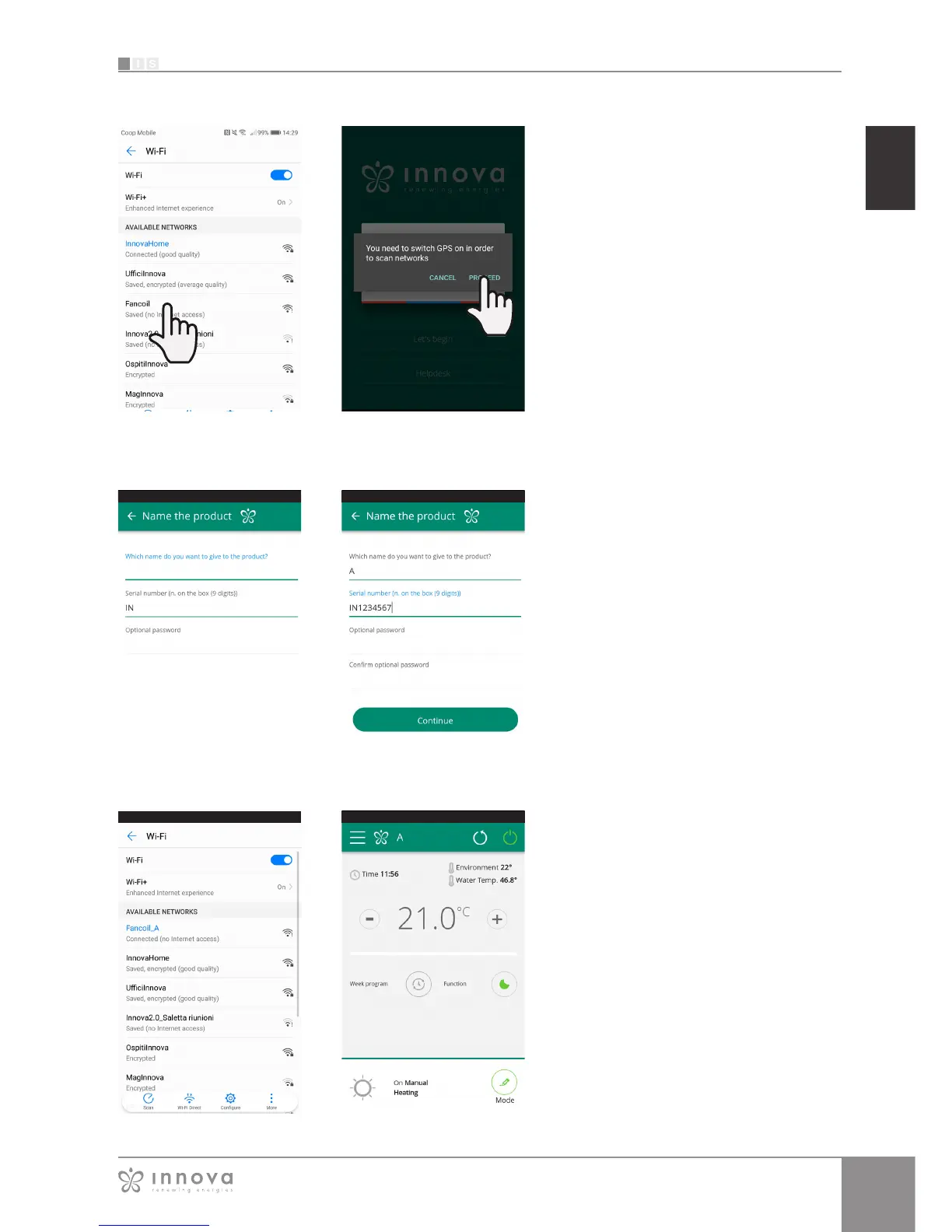
The product screen appears (Figure 9-6) where
you can assign a name and indicate the unit’s
serial number, made up of 9 alphanumeric
characters on the fancoil’s data plate.
A password can be set for the “Fancoil” network
in order to protect against management of your
product by unauthorised users.
Note: For Android devices, after entering the
name of the product, the WiFi network name
also changes automatically.
For iOS devices, once the name has been
edited, you must therefore go back to your
telephone’s WiFi settings and connect to the
renamed network “Fancoil” followed by _ and
the name that you have just established, for
example “Fancoil_A”).
(Figure 9-8)
Note: The device name can also be changed
later by accessing the menu item “My
Products” and tapping on the second icon
(pencil symbol).
After switching on the display of your
fancoil, go to your telephone’s WiFi
settings:
1. ensure that you have activated WiFi
1. check the available WiFi connections
1. find the “Fancoil” network
1. connect to it.
Note: with Android devices, this procedure is
automatic. With iOS devices, you must enter
the WiFi settings of your device and select the
“Fancoil” network.
Note: If there are several air conditioners to
configure, switch on one at a time in order to
prevent errors.
Note: If the App asks you to be connected to
the position, to accept for facilitating the search
of the fancoil. (Figure 9-5)
When one of the configured products is
selected, the general fancoil control screen
appears, through which it can be controlled
and managed. (Figure 2-9)
Note: From this moment on, your smartphone
becomes the remote control that you use to
control the fancoil over the local network, but
not over the Internet.
In order to do this, you must complete another
step: connect to your home WiFi, accessing
your smartphone's settings and then select the
"Remote Control" menu item.
Figure 9-4 Figure 9-5
Figure 9-8 Figure 9-9
Figure 9-6
Figure 9-7









 To Next Page