IMPORTANT: Never push both buttons together as this may damage the unit.
NOTE: When the FF or FR button is depressed, you will hear your selection playing at a distorted
speed. Simply release the button to continue playing at normal speed at the desired position in the
selected track.
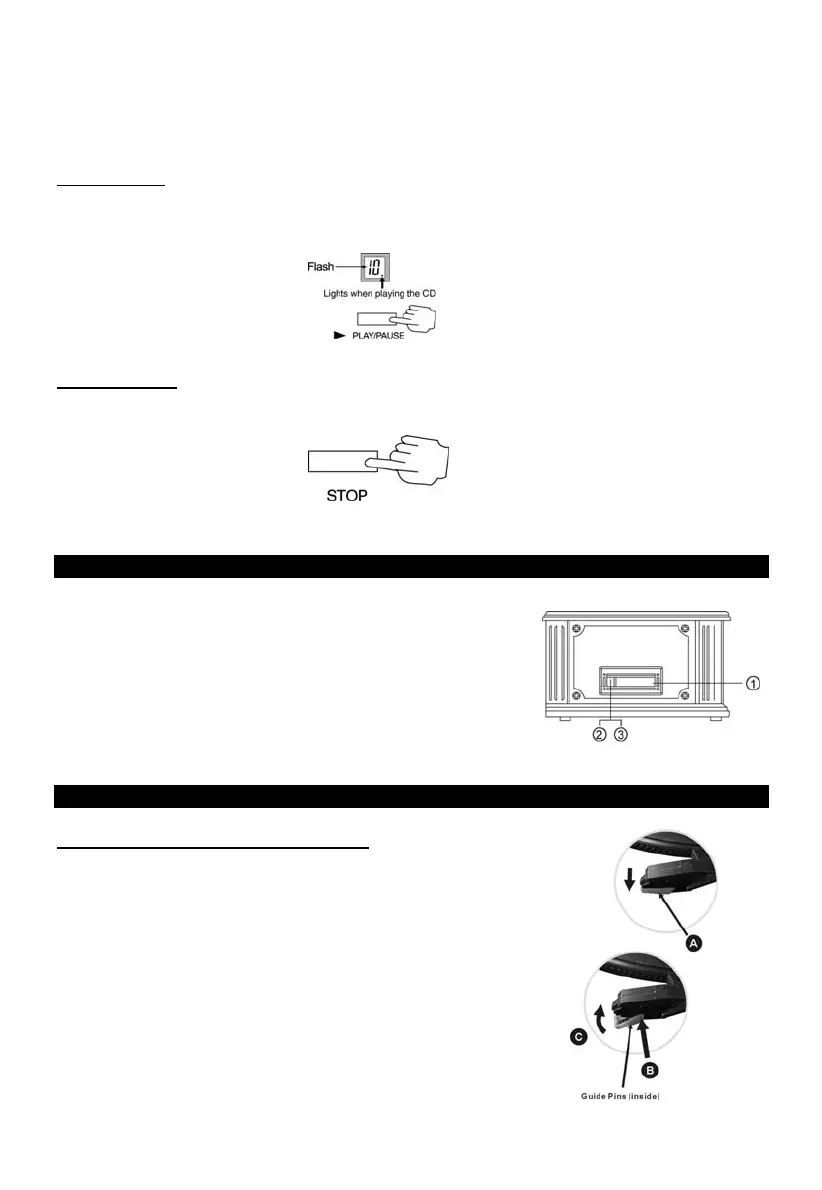
Pausing a CD:
Press the PLAY/PAUSE button will a CD is playing to pause the current track.
Press the PLAY/PAUSE button again to resume play.
Stopping a CD:
Press the STOP button to stop playing the CD
Listening to a Cassette Tape
1. Load an audio cassette tape into the unit (located on the
right side of the unit). Playback will automatically begin.
2. Press button halfway to Fast Forward the tape.
Press button lightly and playback will resume.
3. Press button completely down to end playback and eject Tape.
Maintenance / Proper Handling
How to Replace the Turntable Stylus
Removing the old stylus:
1. Set a screwdriver at the tip of the stylus (A) and push downward.
2. Remove the stylus by pulling it simultaneously downward and
forward.
Installing a new stylus:
1. Hold the front tip of the stylus and insert its rear edge (B) first.
2. Push the stylus upwards (C) until the tip locks into place.
5


 To Next Page