Version 1.4 Page 5
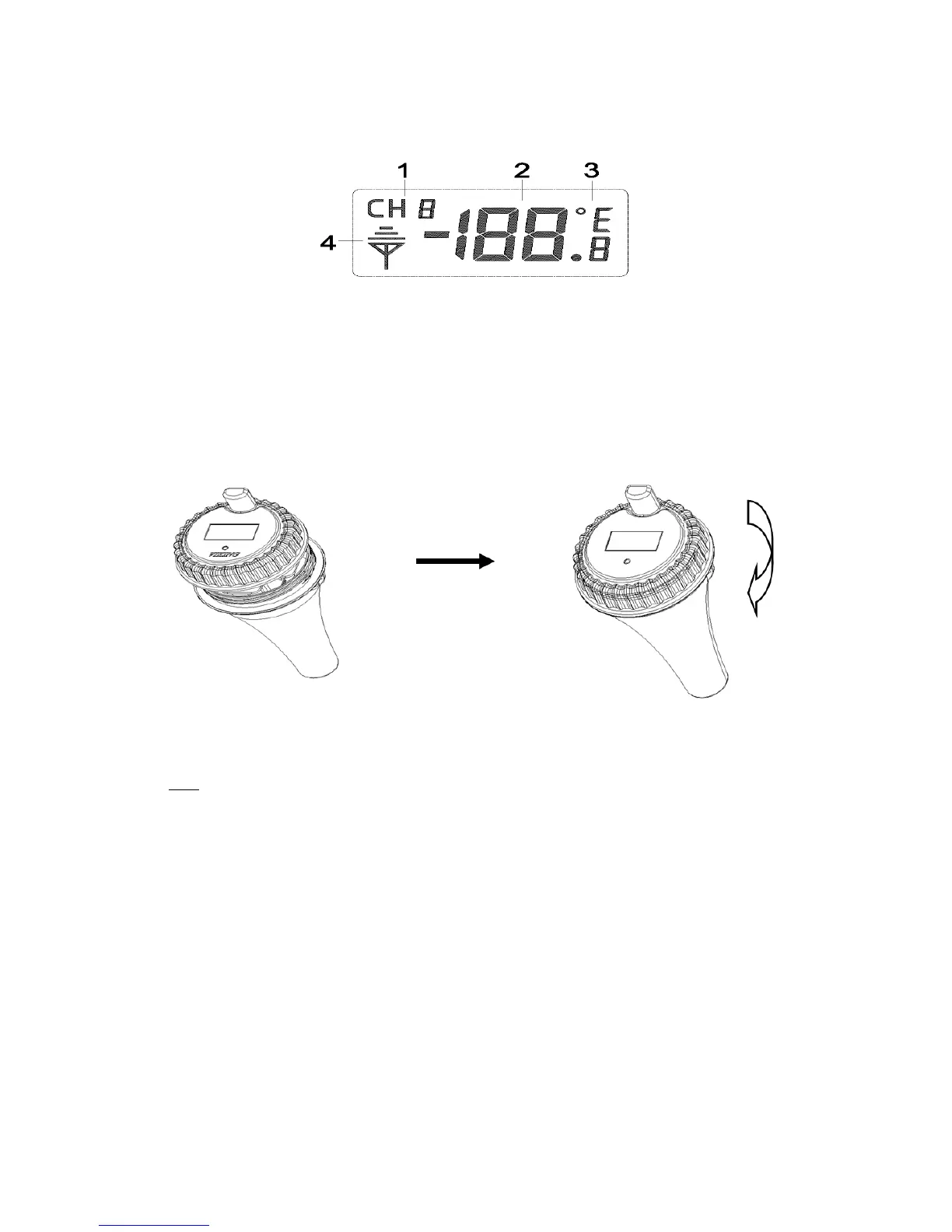
Figure6
1.Transmitterchannelnumber,total3channels
2.Watertemperature
3.Watertemperatureunits
(°F/°C)
4.Transmitterindication(flasheswhensent)
Verifythegasketis properlyseatedintheguideontransmittercover.Twistonthetransmittercover
(clockwise),asshowninFigure.
Figure7
2.3 DisplayConsoleSetUp
Note: To avoid permanent damage, please take note of the battery polarity before inserting the
batteries.
Remove the battery door on the back of the display. Insert 2 AAA 1.5V (alkaline or lithium, avoid
rechargeable)batteriesinthebackofthedisplayconsole.
AlloftheLCDsegmentswilllightupforafewsecondstoverifyallsegmentsareoperatingproperly,
andtheunit
willbeep.
Replacethebatterydoor,andfoldoutthedeskstandandplacetheconsoleintheuprightposition.
The console will instantly display indoor tempera ture, and the default date and time.The
thermometertransmitterwilldisplay‐‐,thenupdateremotetemperatureonthedisplaywithinafew
minutes
.Donottouchanybuttonsuntiltheremotesensorreportsin,otherwisetheremotesensor
search mode will be terminated, and you must power down and power up the console again by
removingbatteries.


 To Next Page