Service Manual 9
Commercial Disposers
Terminal Box & Trim Band
DANGER
ELECTRIC SHOCK! Turn off water and
electrical supply. Discharge capacitor with
1000 ohm jumper wire (1 Phase only). Do
not use a screwdriver to discharge or ca-
pacitor may be damaged.
NOTE: Terminal box and trim band are removed for all repairs
except overload and start capacitor.
Removal
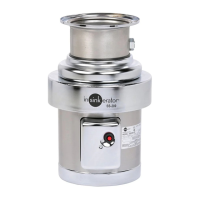
1. Remove screw and terminal box (Figure 8).
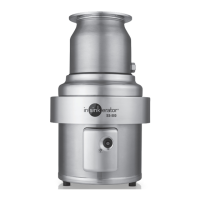
2. Remove two screws securing trim band (Figure 9).
3. Spread the trim seam. While pivoting trim band upward and
forward, slip band over terminal box bracket and remove
band from disposer.
Installation
ELECTRIC SHOCK! Make sure electrical
wires are not pinched or damaged when
installing terminal box cover
1. Insert trim band onto unit. Secure with two screws and
tighten.
2. Install terminal box with overload protector positioned through
rubber grommet. Take care not to pinch lead wires in terminal
box.
3. Secure with screw.
DANGER
Figure 8. Terminal Box
Figure 9. Trim Band



 To Next Page