Need help?
Do you have a question about the Inspire ignite and is the answer not in the manual?
Details the Ignite Smart Sensor's function in detecting environmental factors to improve heating efficiency and its integration with the Ignite Heating System.
Lists the technical details of the Ignite Smart Sensor, including power, temperature, humidity, motion sensing, radio frequency, and dimensions.
Explains how to choose a location for the Smart Sensor considering signal path, obstructions like walls, and interference from metal objects.
Step-by-step guide to put the Ignite Wired system into pairing mode via the Room Thermostat.
Instructions for pairing Ignite Wireless/LITE (March 2021 onwards) with the Receiver.
Instructions for pairing Ignite Wireless 4 channel/LITE 4 channel (March 2021 onwards) with the Receiver.
Instructions for pairing older Ignite Wireless devices (March 2021 and earlier) using the Relay Module.
Guide to put the Smart Sensor into pairing mode by pressing and holding a button until LEDs flash.
Procedure to test the Smart Sensor's signal strength by pressing and holding a button, observing LED feedback.
Details the steps for installing the Ignite Smart Sensor, including removing the cover, marking positions, drilling, and mounting.
Explains how to activate or cancel the 'Boost' feature using the device buttons and how to manage sensors via the online account.
The Ignite Smart Sensor is a device designed to enhance the efficiency of your heating system by detecting temperature, motion, and humidity. It integrates with an existing Ignite Heating System, providing data that helps optimize heating performance.
The primary function of the Ignite Smart Sensor is to monitor environmental conditions within a room. It measures temperature, allowing your heating system to maintain a comfortable climate efficiently. The motion sensing capability helps the system understand occupancy patterns, potentially saving energy by adjusting heating when a room is empty. Humidity detection further contributes to a comprehensive understanding of the indoor environment, enabling more precise and responsive heating control. This data is transmitted wirelessly to the Ignite Receiver (for Wireless/LITE systems) or Thermostat (for Wired systems) via a low-power radio signal.
The Smart Sensor is designed for straightforward use and integration into your home automation setup.
Pairing: Before installation, the Smart Sensor needs to be paired with your Ignite System. The pairing process varies slightly depending on your specific Ignite device:
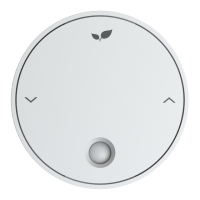
For the Smart Sensor itself, ensure the Inspire leaf logo is at the top, then press and hold the 'V' button for 5 seconds. All 5 LEDs will slowly flash, indicating it's in pairing mode. A successful pairing is indicated by the centre LED rapidly flashing. If pairing fails, the two outside LEDs will rapidly flash, prompting you to retry the procedure.
Testing the System: After pairing, it's crucial to test the signal strength in your desired location. The ideal placement for the Smart Sensor is at a height of 1.0-1.5 meters in a high-traffic area. To enter signal strength mode, hold the '∧' arrow button for 5 seconds. A sweeping LED display will indicate signal detection in progress. The strength is measured on a scale of 1-5 lighting LEDs; for effective operation, a minimum of two LEDs should be lit. If the unit hasn't been paired, two outside LEDs will rapidly flash, indicating a need to return to the pairing instructions.
Boost Function: The Smart Sensor includes a "Boost" function. To activate Boost, press the '∧' button twice. To cancel Boost, press the 'V' button twice. This feature likely provides a temporary increase in heating or a specific mode for a short period.
Online Account Integration: Once paired, you can log in to your online account to view and configure your new Smart Sensor. If you're adding multiple Smart Sensors, you can rename them via your online account by clicking on the unit setup. It is recommended to name them as you pair them to the Ignite system for easier identification and management.
Radio Signal Considerations: When choosing a location, consider the radio signal path. The signal degrades with distance and, more significantly, when passing through objects like walls. The Smart Sensor communicates via a low-power radio. While it should generally communicate through two single-skin brick or stud walls, thick or multiple walls can impede the signal. Large metal objects such as boilers, radiators, and mirrors can also adversely affect radio performance; ensure the sensor is placed at least 1 meter away from such objects. If signal issues persist, consider repositioning components or exploring an Ignite Signal Booster.
The Ignite Smart Sensor is designed for easy installation and battery replacement.
Environmental Considerations: The Smart Sensor should not be installed in areas subject to extended periods of high humidity, such as bathrooms, as this could affect its performance or longevity.
 General
| Wi-Fi Enabled | No |
|---|---|
| Backlight | Yes |
| Hold Function | Yes |
| Filter Change Alert | Yes |
| Power Source | Battery |

 To Next Page