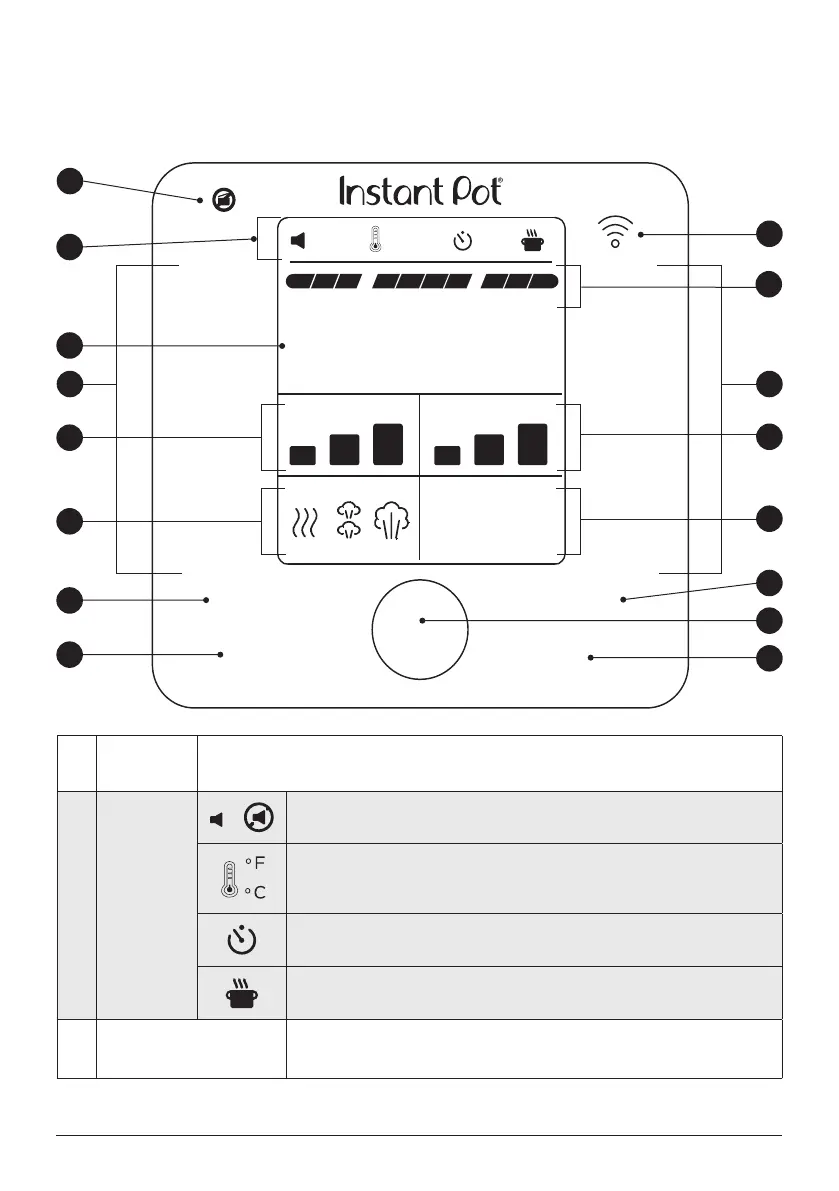
CONTROL PANEL
1
Pressure
indicator
Lights up when there is pressure in the multicooker to show that the lid is locked and
cannot be removed.
2
Status
icons
|
Shows if sounds are On or Off, as indicated.
Indicates if the temperature scale is showing in Fahrenheit (°F) or Celsius (°C).
See Control panel: Settings for details.
Delay Start or cooking timer is running.
Appears when Keep Warm is running, or is set to turn on after cooking finishes.
3 WiFi indicator
Lights up when paired with the Instant Brands Connect App and connected to a
device.See WiFi for more information.
18 | support@instantpot.com.au | 1800 251 643
The Pro Plus has a touch screen control panel that’s easy to use and understand.
Pressure
Cook
Pro Plus
Pressure
Pre-heating
On
º
F
AM
PM
º
C
Off
Cooking Keep Warm
Temperature
Venting
NutriBoost
TM
On
Off
Slow
Cook
Sous
Vide
Keep WarmDelay Start
Sauté
Cancel Start
Steam
Yogurt
Rice
Canning
05:20
Low High
Natural Pulse Quick
Max Low High Cus
5
6
7
9
12
14
15
8
10
11
13
2
3
44
1
Illustrations in this document are for reference only and may differ from the actual product.
Always refer to the actual product.













 To Next Page