CAUTION: Do not attempt any repairs or maintenance of
CoreDry with the power cord connected to AC
Power. Make sure it is unplugged, and then contact
InstroTek for instruction.
Tools Needed: #2 Phillips screwdriver, 4" Adjustable wrench
1. Turn CoreDry off and unplug unit from power source.
2. Remove tank and cold trap lids from unit.
3. To remove top cover of CoreDry, unscrew 4 pan head
#6 black screws located on outside surface of green top
cover (4 screws total 1 on each side at the back edges
and 1 on each side in the middle near the bottom).
4. Prior to lifting top cover place a piece of foam or other
support in front of CoreDry.
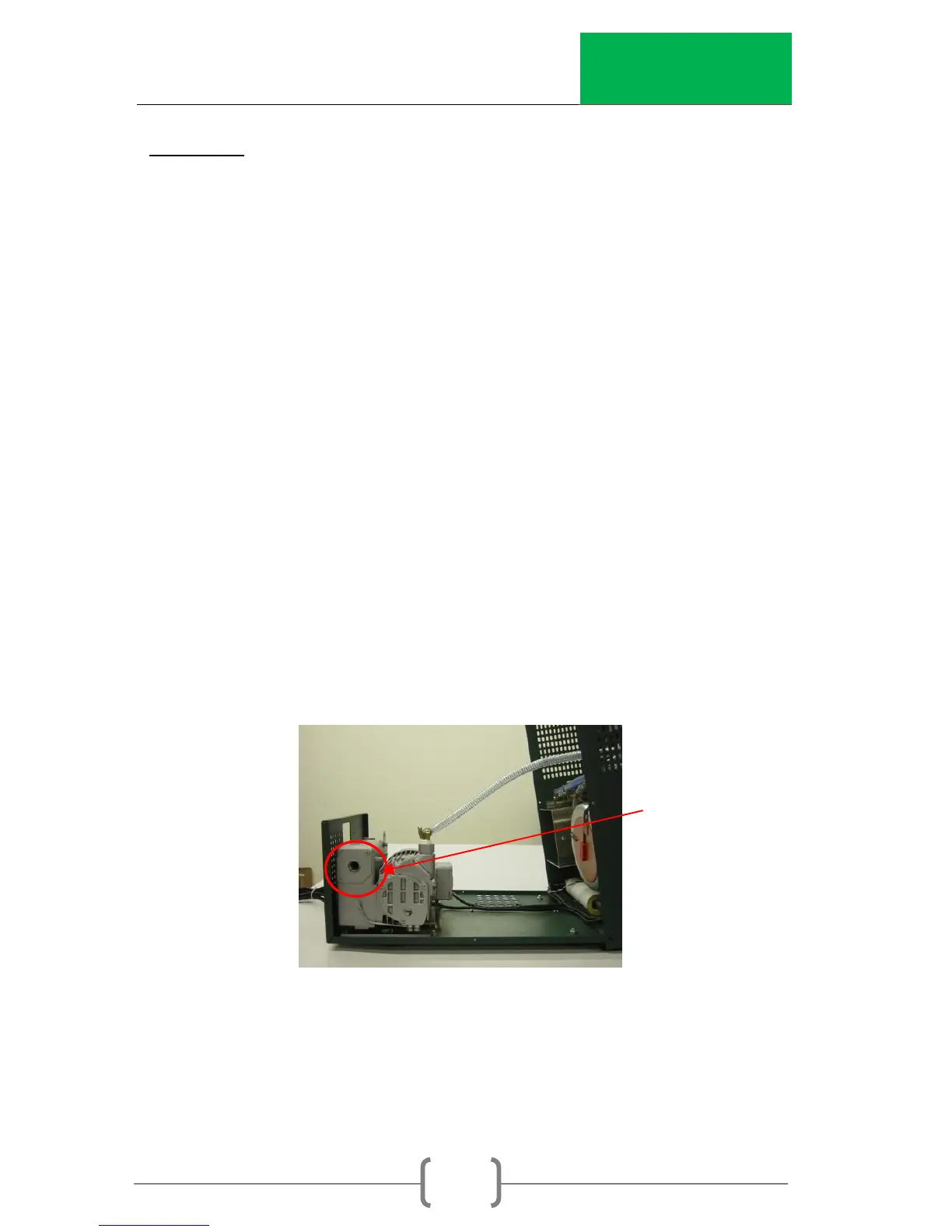
5. Lift top cover and rotate towards the front to expose the
pump located towards the rear of the unit. (Pull the
sides out slightly to clear the inside components when
removing and replacing the top cover.)
6. Locate the exhaust port on the left side of the vacuum
pump. Remove the Exhaust Cover. After removing the
four bolts, you may have to gently pry the cover off with
a flat screwdriver.
7. Remove filter stuffing to expose exhaust filter.
8. Loosen screw located on the bar clip holding the exhaust
filter in place. Remove bar when loosened.


 To Next Page