sides out slightly to clear the inside components when
removing and replacing the top cover.)
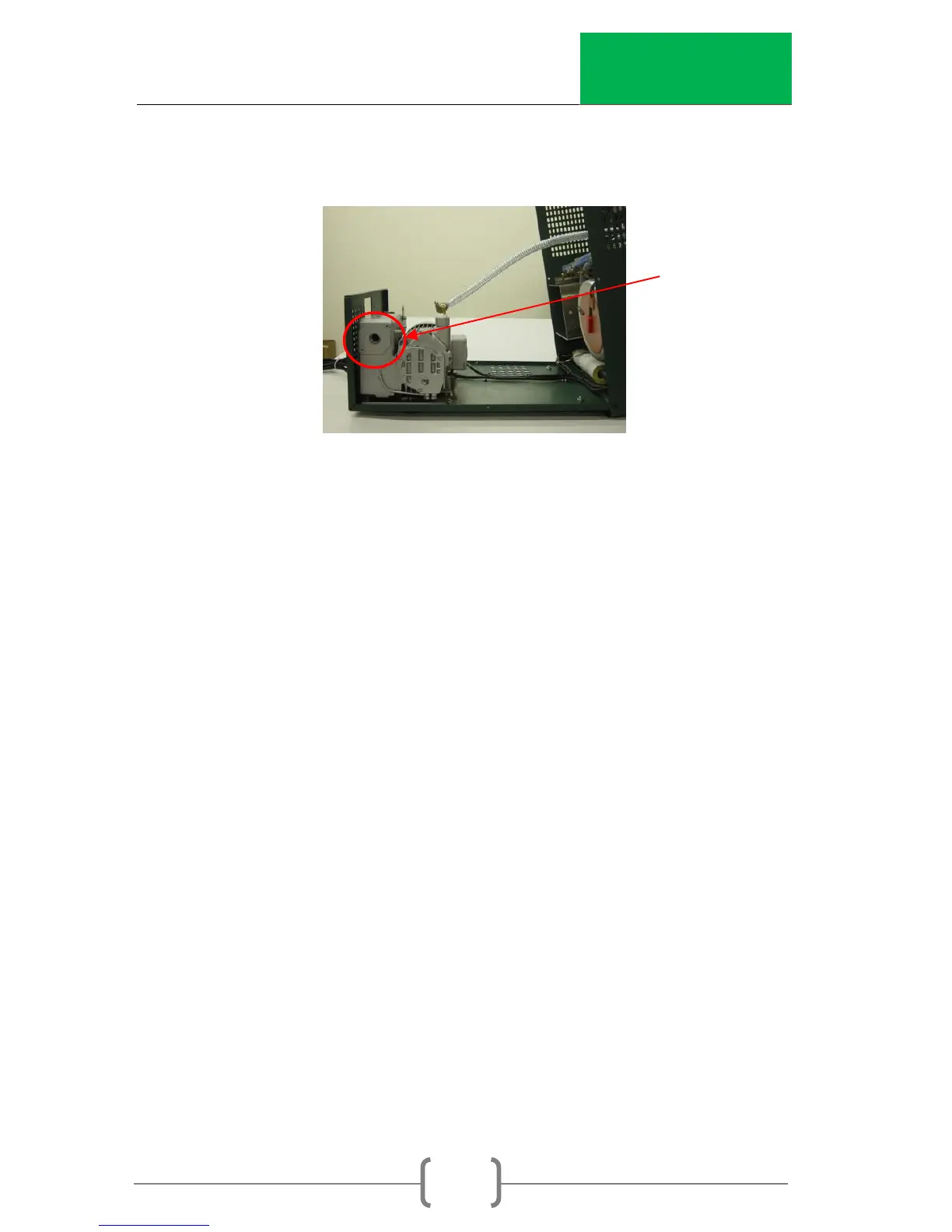
6. Use 5/32 Allen wrench to remove two screws holding
pump filter cover.
7. Use a 10mm or 3/8 Allen wrench to unscrew filter inside
the pump housing.
8. Verify that O-Ring is removed with old filter.
9. Replace with new filter and reassemble cover.
10. Go into Menu option 10 and reset the timer for the
Exhaust Filter.
Verify Vacuum Pressure Reading (every 6 months)
1. Warm up CoreDry by running the unit empty with both
lids on for three separate tests.
2. Dry Cold Trap to make sure there is no moisture inside
the Cold Trap.
3. Place Vacuum Gauge inside sample chamber and
place lids on both Sample Chamber and Cold Trap.
4. Start test by pressing Enter.
5. As the pressure drops compare the readings on the
CoreDry display to the Vacuum Gauge inside the
Sample Chamber. Pressure can only be compared
during the Vacuum Cycle. At T= 5 take note of final
pressure on Vacuum Gauge and compare to CoreDry
displayed pressure.
6. If the two readings are the same no adjustment is
necessary. Continue using the unit and verify again in 6
months.


 To Next Page