7
ENG
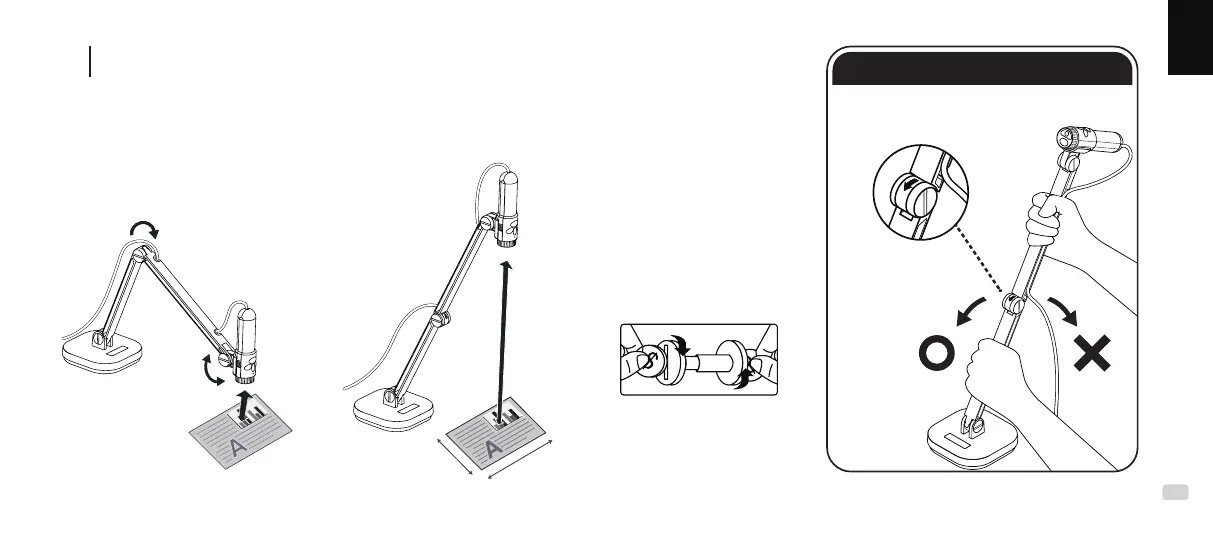
Hold the INS-3 to capture images at any angle, or place it on a desk to
capture images of objects and documents placed below it. Change the
height and /or posioning of the mul-joint camera bracket to capture
the desired image.
Forcing the arm against the hinge
direcon may break the arm.
Hinge Direcon
Minimum
height 10 cm
Note :
Tighten the device
arm using two coins.
Maximum height 31cm, for maximum
eld of view 30 cm x 40 cm
Adjusting INS-3 position
F
30 cm
40 cm
31 cm
10 cm
CAUTION



 To Next Page