48
Advanced Speaker Connection
Bi-Amping
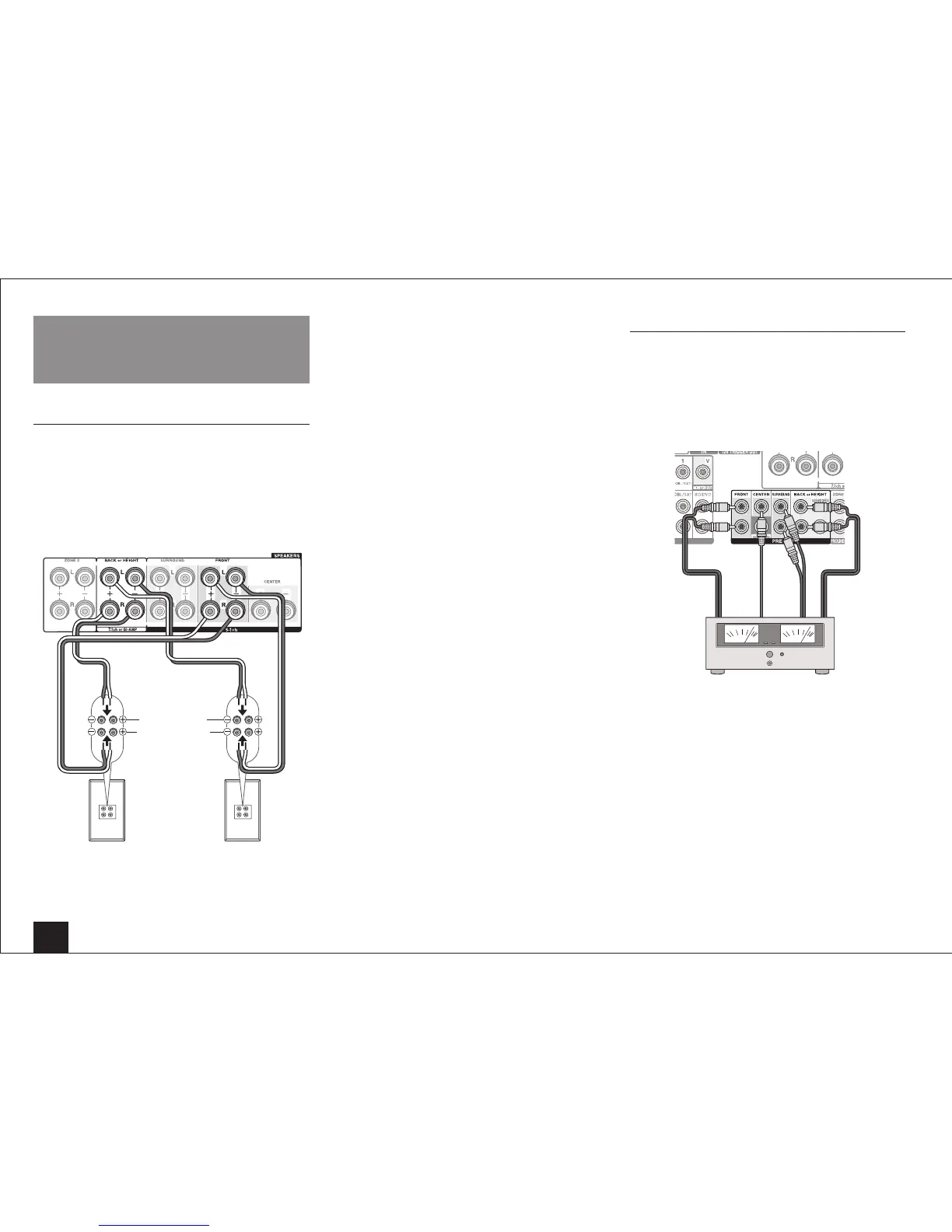
It is possible to connect speakers supporting bi-amping to
improve quality of the bass and treble. Up to 5.1 ch will be
played in bi-amping.
Connections
1.
Connect as below using the FRONT terminals and
BACK or HEIGHT terminals.
Front R Front L
Tweeter (treble)
Subwoofer (bass)
2.
Turn the unit on and set "Speaker Setup" to "Bi-Amp".
1
After pressing RCV, press Home on the remote
controller.
2
Select "Setup" with the cursors and press Enter.
3
With the cursors, select "2.Speaker Setup" -
"Speaker Settings" - "Front Speakers Type".
4
Select "Bi-Amp" with the cursors.
• Before bi-amping, be sure to remove the short-
circuit connector that connects the tweeter (treble)
terminal and the subwoofer (bass) terminal.
• Use speakers supporting bi-amping only. For
details, refer to the speakers' instruction manual.
Connecting a Power Amplifier
You can connect a power amplifier to the unit and use the
unit as a pre-amplifier in order to produce a large volume
that cannot be output with the unit only. Connect the
speakers to the power amplifier. For details, refer to the
power amplifier's instruction manual.
Connections
Power amplifier
• Set the unconnected channels to "None" in "Speaker
Configuration".
– After pressing RCV, press Home on the remote
controller. Select "Setup" with the cursors and press
Enter. Then select "2.Speaker Setup" - "Speaker
Configuration" and set the unconnected channels to
"None".



 To Next Page