En-7
'
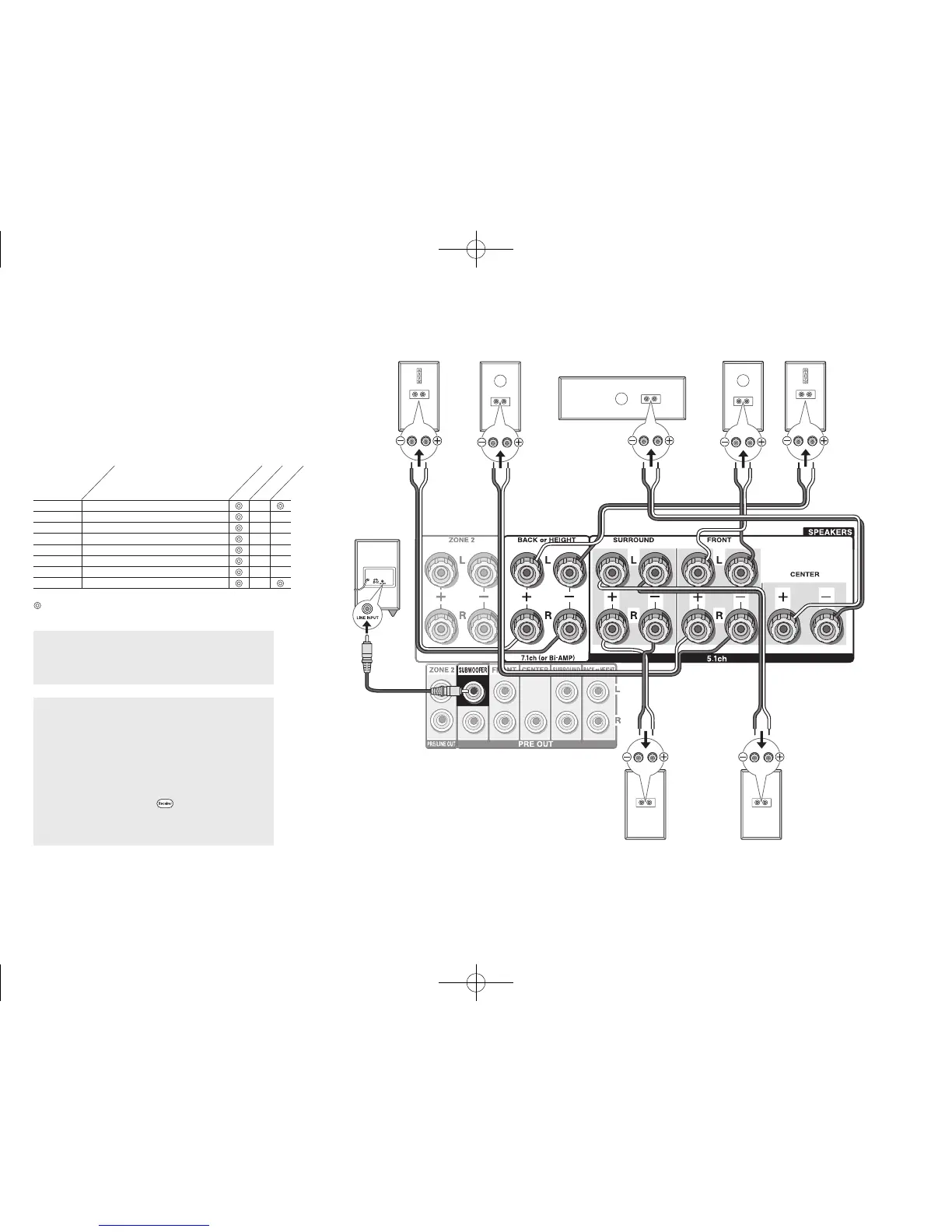
Subwoofer with built-
in power amplifier
&
Surround R
8FH
Right back
Or right height
79G
Left back
Or left height
%
Surround L
$
Center
#
Front R
"
Front L
A speaker
configuration
where only one
back speaker is
connected is not
supported.
and the other type is designed to be integrated with normal
speakers. Dolby Enabled Speakers placed with their
diaphragms facing toward the ceiling create higher effect
in the Dolby Atmos and Dolby Surround listening modes
by providing sounds echoing off the ceiling. You can select
(g)(h) or (i)(j) on the unit. For connection with the unit,
use the SPEAKERS BACK or HEIGHT terminals.
When playing Dolby Atmos, the speakers required depend
on how you have setup your back speakers or height
speakers. The following shows combinations of speakers
for reproducing Dolby Atmos.
1 Back
2 Front High
3 Rear High
4 Top Front
5 Top Middle
6 Top Rear
7 Dolby Enabled Speaker (Front)
8 Dolby Enabled Speaker (Surround)
Connection
pattern
Front
Center
Surround
Back or Height
: Required, : Optional
Connection of a subwoofer is optional.
Important: (North American models)
speaker with less impedance than the supported value
may result in failure.
Important: (Australian models)
have to change the setting if any of the speakers
a speaker with less impedance than the setting may
result in failure. You can set up by viewing the guidance
displayed on the TV screen. Select the item with the
cursor buttons of the remote controller and press Enter
to confirm your selection. To return to the previous
screen, press Return. Press
Receiver and then
Setup on the remote controller. Select "2. Speaker" -
"Configuration" - "Speaker Impedance" and change the
default value from "6ohms" to "4ohms".
DTR-30.7_BAS_En_SN29401993_150414.indd 7 2015/05/14 16:32:48



 To Next Page