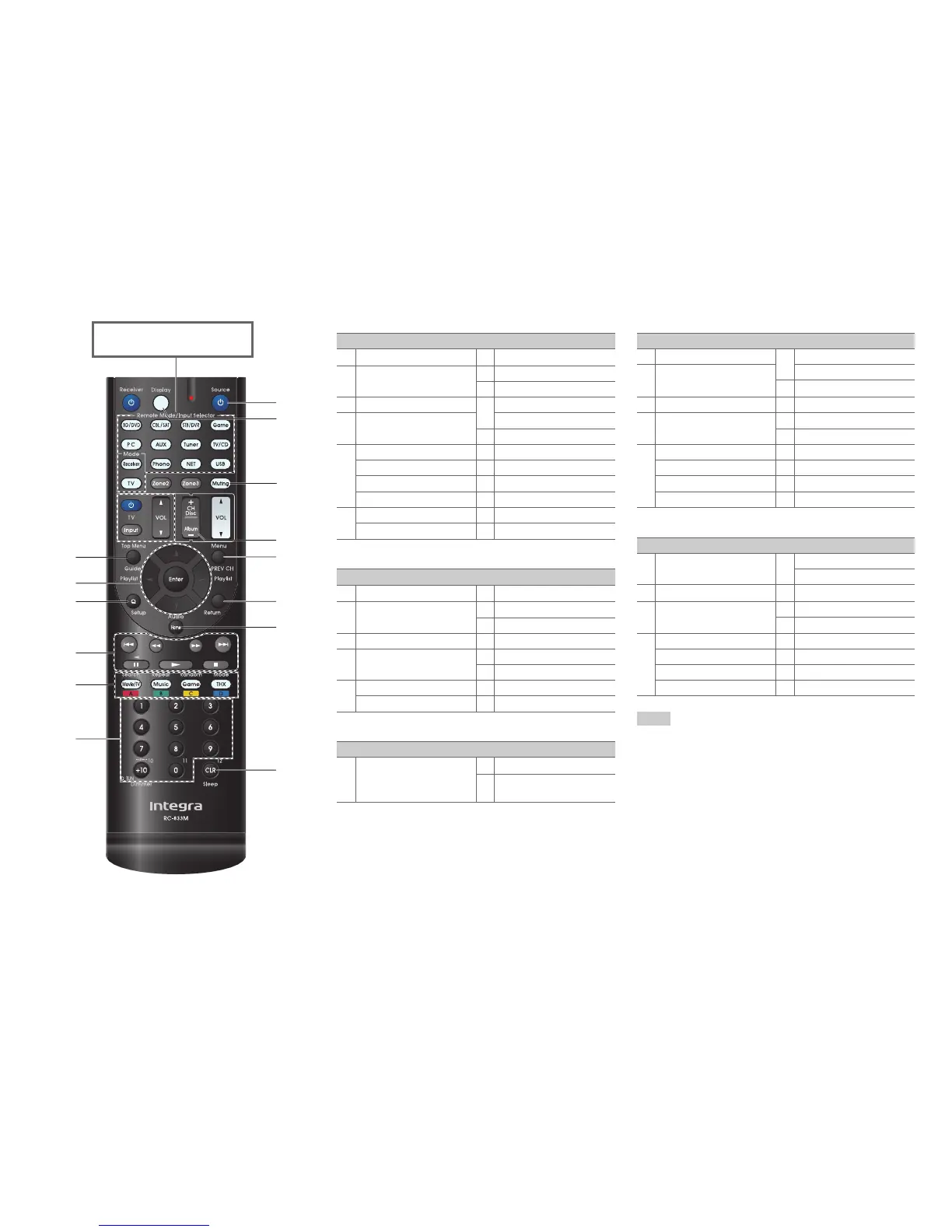
Controlling Other Components
En-80
■ DVD player/DVD recorder operation
■ VCR/PVR operation
■ Cassette tape deck operation
■ Satellite receiver/Cable receiver operation
■ CD player/CD recorder/MD recorder operation
Note
• With some components, certain buttons may not work as
expected, and some may not work at all.
• See “Controlling Your iPod/iPhone” about the operation of
iPod/iPhone (➔ page 75).
*1
The p function is not supported. The p
supported by the AV receiver is the CEC system control
function of the HDMI standard.
h
l
m
n
o
k
j
g
c
b
d
e
f
i
Press the appropriate Remote
Mode button first.
Available buttons
b
Top Menu
h 8Source
c q/w/e/r
Enter
i
Display
j
Muting
d
Setup
k
CH +/–
e 1, 3, 2, 5, 4,
7, 6
Disc +/–
l
Menu
f
A
(Red)
*1
m
Return
B
(Green)
n
Audio
*1
C
(Yellow)
*1
o
CLR
D
(Blue)
*1
g
Number: 1 to 9, 0
Number: +10
*1
Available buttons
b
Guide
h 8Source
c q/w/e/r
Enter
i
Display
j
Muting
d
Setup
k
CH +/–
e 1, 3, 2, 5, 4,
7, 6
l
PREV CH
m
Return
g
Number: 1 to 9, 0
o
CLR
Number: +10
Available buttons
e 1, t (Reverse
Playback), 2, 5, 4,
7, 6
h 8Source
j
Muting
Available buttons
b
Guide
g
Number: 1 to 9, 0
c q/w/e/r
Enter
Number: +10
h 8Source
d
Setup
i
Display
e 1, 3, 2, 5, 4,
7, 6
j
Muting
k
CH +/–
f
A
(Red)
l
PREV CH
B
(Green)
m
Return
C
(Yellow)
n
Audio
D
(Blue)
o
CLR
Available buttons
c q/w/e/r
Enter
g
Number: 1 to 9, 0
Number: +10
d
Setup
h 8Source
e 1, 3, 2, 5, 4,
7, 6
i
Display
j
Muting
f
Search
k
Disc +/–
Repeat
o
CLR
Random
Mode


 To Next Page