Safety Information and Introduction
En-10
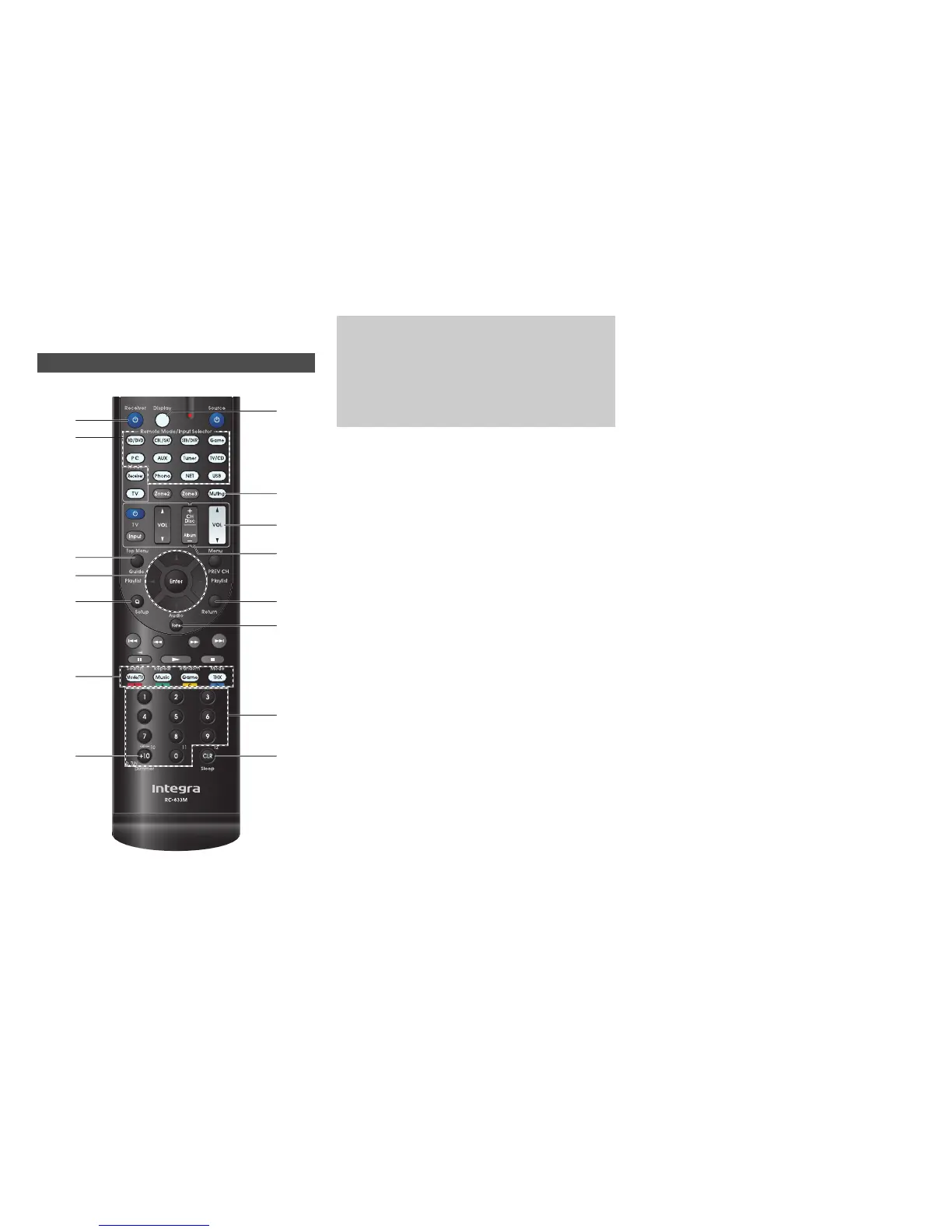
Remote Controller
For detailed information, see the pages in parentheses.
a 8Receiver button (19)
b Remote Mode/Input Selector buttons (22)
c Guide (Speaker layout) button (46)
d q/w/e/r and Enter buttons
e QSetup button (47)
f Listening Mode buttons (37)
g Dimmer button (45)
h Display button (45)
i Muting button (46)
j VOL q/w button (22)
k Return button
l Home button (44)
m Sleep button (45)
■ Controlling the tuner
To control the AV receiver’s tuner, press Tuner (or
Receiver).
You can select AM or FM by pressing Tuner repeatedly.
a q/w buttons (31)
b D.TUN button (31)
c Display button
d CH +/– button (31)
e Number buttons (31)
Controlling the AV Receiver
a
j
k
l
d
m
bg
e
c
ad
b
i
hc
e
f
To control the AV receiver, press Receiver to select
Receiver mode.
You can also use the remote controller to control
Integra/Onkyo Blu-ray Disc/DVD player, CD player,
and other components.
See “Entering Remote Control Codes” for more
details (➔ page 77).



 To Next Page