19
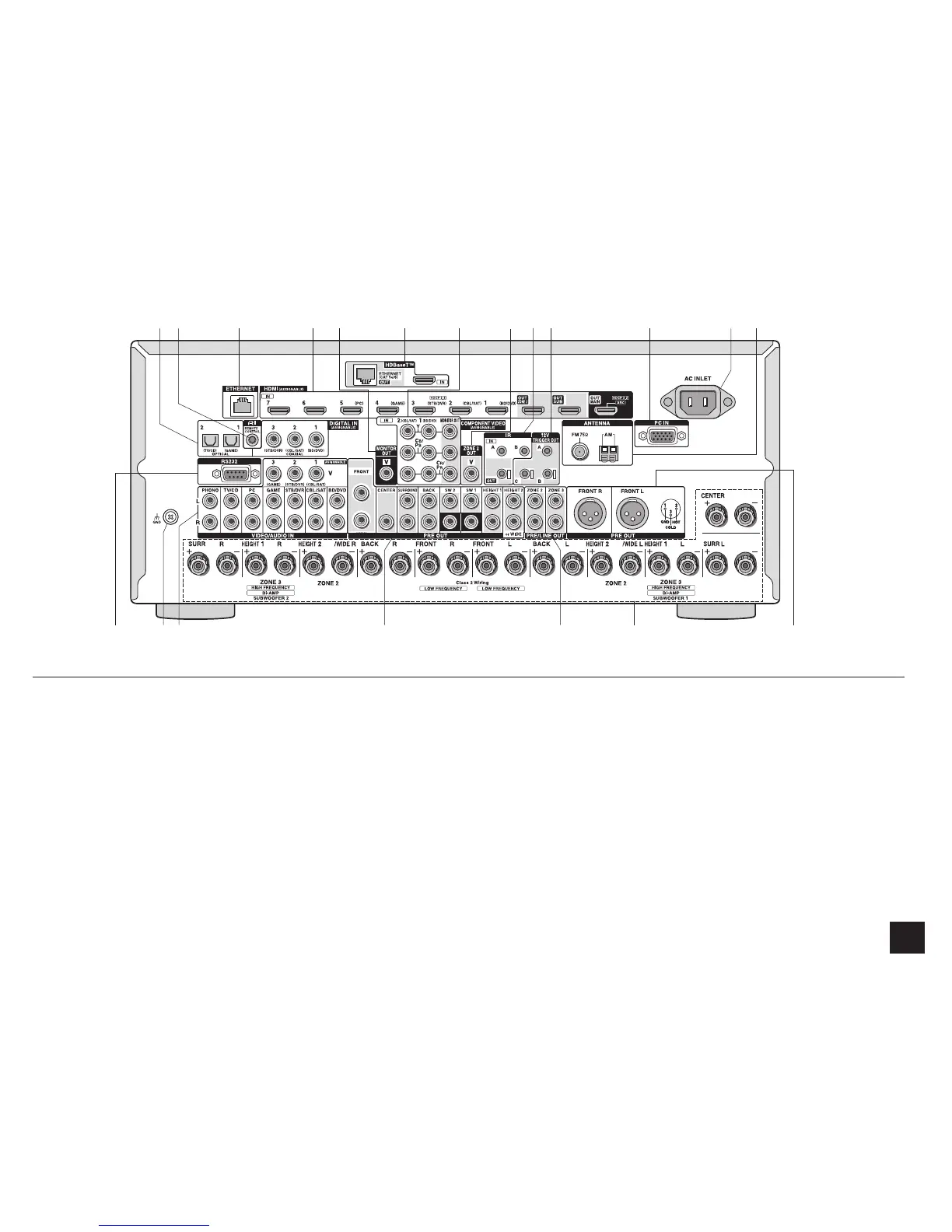
Rear Panel
1
DIGITAL IN COAXIAL/OPTICAL jacks: Digital audio
signals are input.
2
RI REMOTE CONTROL jack: An Onkyo product with RI
jack can be connected and synchronized with this unit.
3
ETHERNET port: Used for LAN connection
4
HDMI IN/OUT jacks: Digital video signals and audio
signals are transmitted between the unit and the
connected devices.
5
MONITOR OUT V jack: Video signals are output to the
connected monitor or TV.
6
HDBaseT ™ IN / OUT ports: HDMI input signals are
output via the Ethernet cable. As they are covered with
a seal when shipped, remove it when you use the ports.
Do not use the ports to connect the Ethernet port of
network device.
7
COMPONENT VIDEO IN and OUT jacks: Component
video input/output jacks.
8
ZONE 2 OUT V jack: Video signals of the player are
output to the connected TV in the separate room.
9
IR IN A/B, IR OUT jacks (
¼
): Connected to the
multiroom remote control kit.
F
12V TRIGGER OUT A/B/C jack (
¼
): Allows you to
connect a device with trigger input jack in a separate
room to enable power link operation between the device
and the unit.
G
PC IN jack: PC is connected via an analog RGB cable.
H
AC INLET: The power cord is connected.
I
(/#06'00#LCEMŝCPF#/#06'00#
terminal: The supplied antennas are connected.
J
RS232 port
(
¼
)
: Connected to the home control system.
K
GND terminal: The ground wire of the turntable is
connected.
L
Composite video and analog audio jacks: Analog
video signals and audio signals are input.
M
PRE OUT jacks: A power amplifier or subwoofer with
built-in amplifier is connected.
N
PRE/LINE OUT ZONE 2/ZONE 3 jacks: Audio output
jacks connected to the pre-main amplifier for multi-zone
playback in a separate room.
O
SPEAKERS terminals: Speakers are connected. To
use the Multi-zone function, connect the speakers in the
separate room to the ZONE2 speaker terminals.
P
PRE OUT BALANCE jacks: An amplifier with balance-
type XLR input jacks is connected.
¼
Special devices or cable connections are necessary to use the
control functions
9
,
F
and
J
. Contact the specialized stores for
more information.
14
KL
2
3
56789
M NJ
FGHI
OP



 To Next Page