12
Troubleshooting
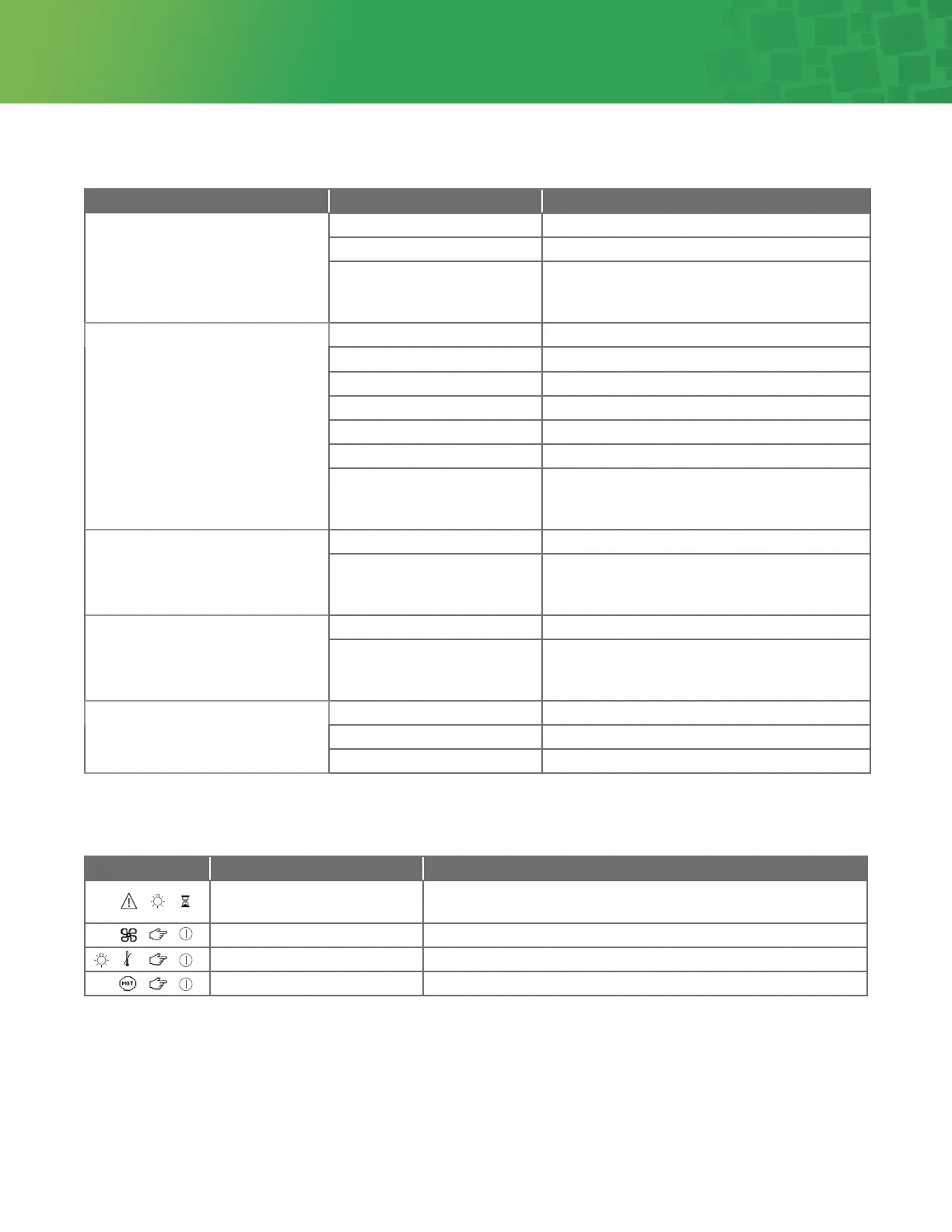
Trouble Area Possible Cause Corrective Action
No power Light source not plugged in Plug in light source
Top cover not closed Close and secure top cover
System overheated Contact Integra for service
NOTE: System may cycle on/off if le plugged
in and powered
No light output Light source not turned on Turn power on
Bad/no lamp Check lamp seating/replace lamp module
Aenuator closed Verify not in standby mode
Turret mispositioned Rotate turret to desired adapter fiing
Blown fuse Replace fuse as indicated in maintenance section
Cooling system obstructed Clear obstructions, cycle power
System overheated Contact Integra for service
NOTE: System may cycle on/off if le plugged
in and powered
System shuts down
during use
Cooling system obstructed Clear obstructions, cycle power
System overheated Contact Integra for service
NOTE: System may cycle on/off if le plugged
in and powered
Lamp shroud shows signs
of melting
Cooling system obstructed Clear obstructions, cycle power
System overheated Contact Integra for service
NOTE: System may cycle on/off if le plugged
in and powered
Reduced Light Output Cable mismatched to turret Rotate turret to matching adapter fiing
Aenuator mispositioned Verify not in standby mode
Bad lamp Replace lamp module
Fault Symbol Possible Cause Corrective Action
Lamp change (will blink aer
1000 hours)
Change lamp. Module Part number 001320LX
Fan failure Shut off system to reset. If it does not reset contact Integra for service
Lamp overheat Shut off system to reset. If it does not reset contact Integra for service
Aenuator motor failure Shut off system to reset. If it does not reset contact Integra for service


 To Next Page