- 8 -
10. Speaker
Built-in speaker.
11. PTT key (Push-To-Talk)
To transmit, press and keep pressed the PTT key (11), then speak into the microphone with your
normal voice. To receive release the PTT key (11).
12. Lamp Key
Rubber key to switch ON and OFF the LCD backlight function.
13. Monitor Key
Press this key to open the Squelch and release it to close the Squelch.
14. External earset-microphone jack rubber cover
This cover protects the external earset-microphone jack and makes the radio splash proof.
15. Desktop Charger Contacts
Getting Acquainted with the Product
English
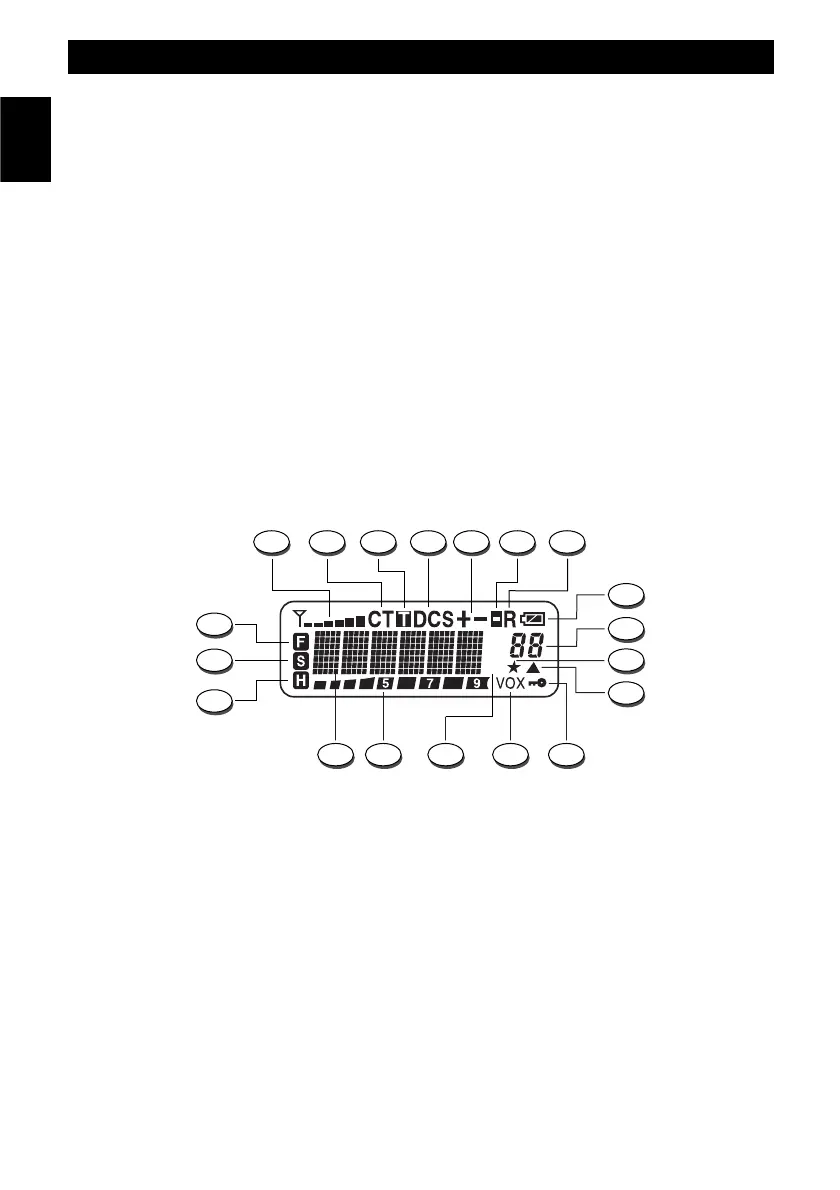
LCD DISPLAY
A. Signal Digital Bar Meter
Indicates the received signal strenght in the receive mode.
B. CT Indication
The CT indication is lighted when the CTCSS function is enabled.
C. T Indication
Non available on this model.
D. DCS Indication
The DCS indication is lighted when the DCS function is enabled.
E.
+ -
Indication
Non available on this model.



 To Next Page