- 7 -
English
GETTING ACQUAINTED WITH THE PRODUCT
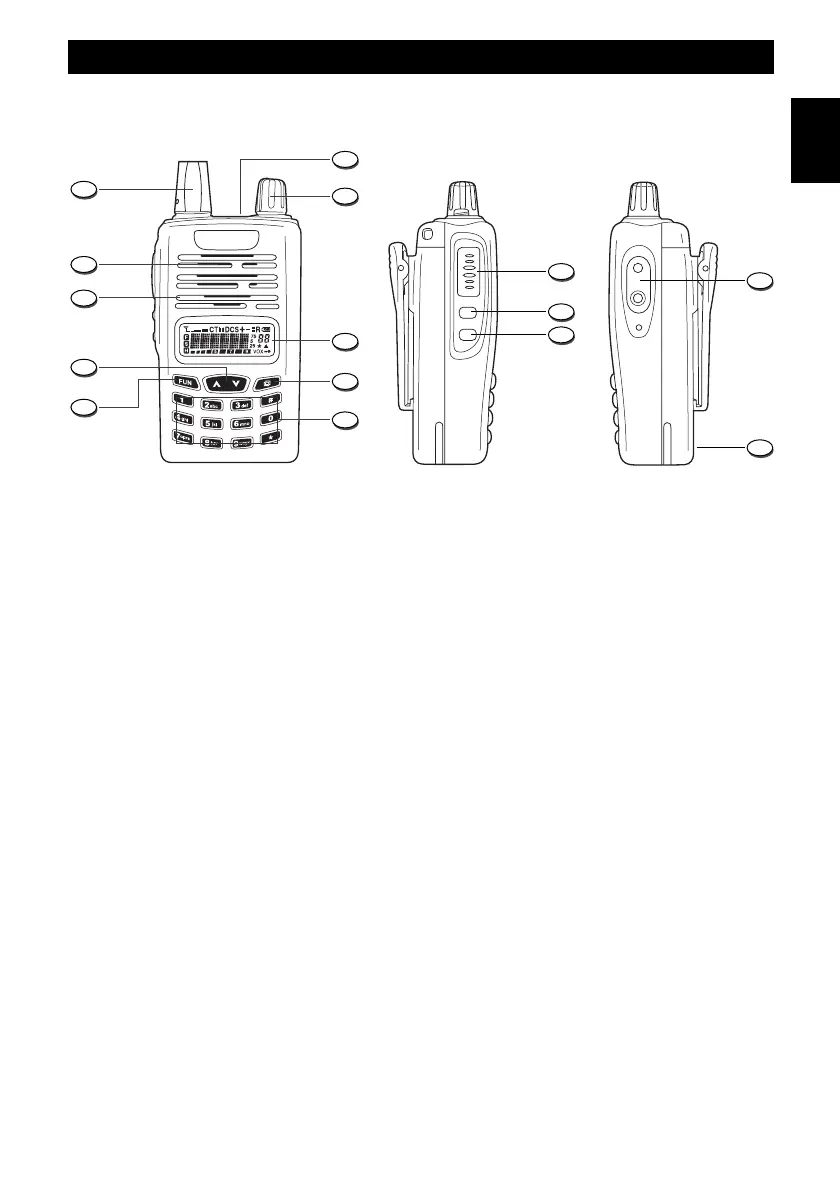
1. Antenna
Rubber flexible antenna with SMA connector.
2. RX/TX LED Indicator
The LED indicator will light in green colour when the radio is receiving a signal and in red colour
during transmission.
3. Power ON switch and volume control
Switch on the transceiver turning the knob clockwise or counterclockwise to switch it off.
To increase the volume, turn the knob clockwise or counterclockwise to decrease it.
4. LCD Display
Backlighted Dot Matrix LCD Display, provides clear reading and full information on every function
and status of the radio.
5. Confirmation Key
It selects and confirms the Menu selections.
6. Numeric Keypad
7. Fun Key
Function key to quickly access several functions of the radio.
8. UP/DOWN Keys
Channels and menu operation selection keys.
9. Microphone
Built-in microphone.



 To Next Page