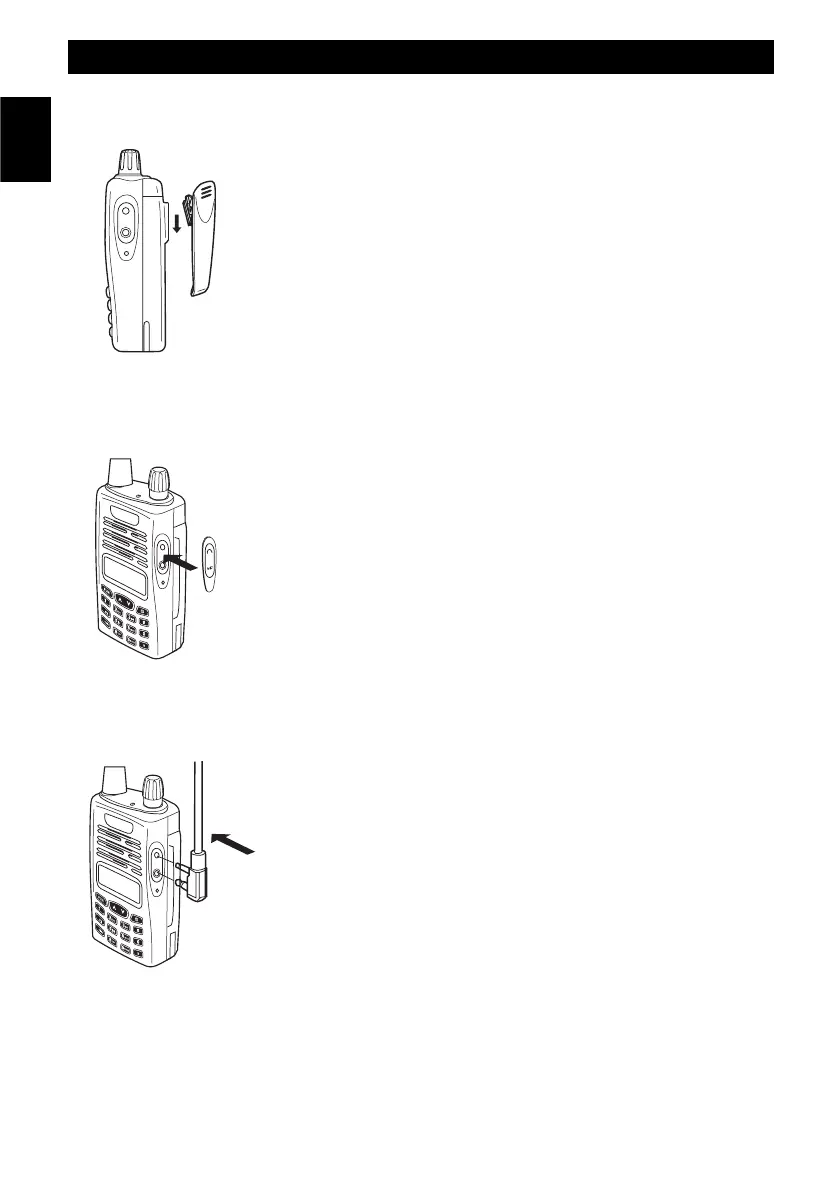
To install / to remove the belt clip
If necessary, attach the belt clip to the tranceiver, making it slide along the
fit runner placed on the rear side of the battery untill the lock will hook. To
remove the belt clip press the lock and slide the belt clip away from
the battery.
Install the external earset-microphone jack rubber cover.
If an external earset-microphone is not used, please install the earset-
microphone jack rubber cover.
Install the earset-microphone jack rubber cover, by matching the three
rubber tabs with the holes on the radio, as showed on the drawing.
If the earset-microphone jack rubber cover is removed, radio will not be
splash proof.
To install the external microphone (optional)
To install the external microphone, remove the protection cover of the
external microphone/speaker jack. This cover ensures the watertight
integrity of the transceiver (spray-guard) that will not be ensured after its
removing. Insert the connector of the external microphone into the
right jack.
In order to avoid mulfunction or damage to the transceiver, use only
original microphones. Using non original accessories will authomatically
void the warranty.
Warning !
If an external earset-microphone is used, radio will not be splash proof.
Preliminary Steps
- 6 -
English



 To Next Page