Technical Reference
53
2.2.2.6 Front Panel USB Headers
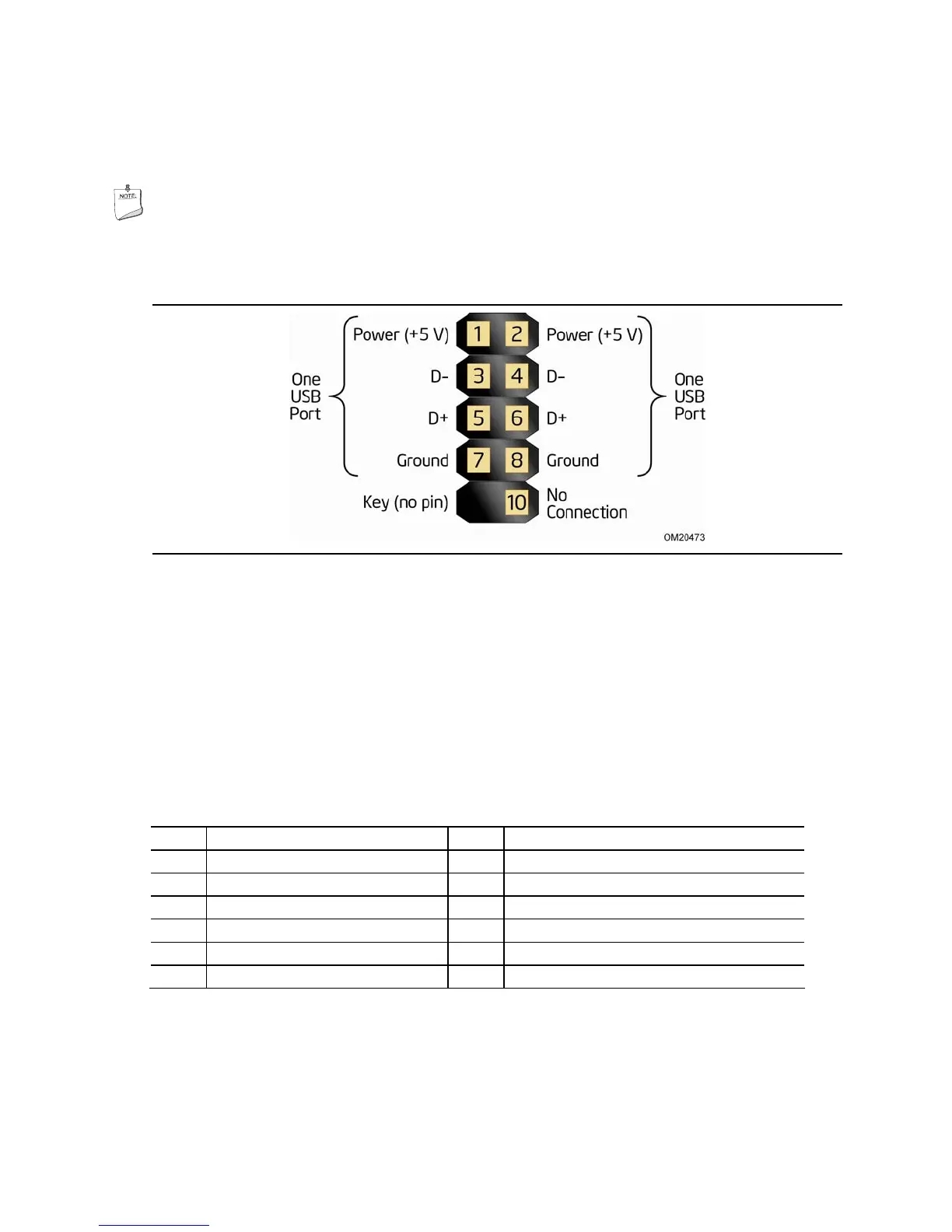
Figure 12 is a connection diagram for the front panel USB headers.
NOTE
• The +5 V DC power on the USB headers is fused.
• Use only a front panel USB connector that conforms to the USB 2.0 specification
for high-speed USB devices.
Figure 12. Connection Diagram for Front Panel USB Headers
2.2.2.7 Low Pin Count (LPC) Debug Connector
During the POST, the BIOS generates diagnostic progress codes (POST codes) to I/O
port 80h. If the POST fails, execution stops and the last POST code generated is left
at port 80h. This code is useful for determining the point where an error occurred.
Displaying the POST codes requires a POST card that can interface with the Low Pin
Count (LPC) Debug connector. The POST card can decode the port and display the
contents on a medium such as a seven-segment display.
Table 24. LPC Debug Connector
Pin Signal Name Pin Signal Name
1 VCC3 2 VCC3
3 PLTRST_N 4 LPC_CLK
5 LAD0/FWH0 6 LAD1/FWH1
7 LAD2/FWH2 8 LAD3/FWH3
9 LFRAME_N/FWH4 10 GND
11 GND



 To Next Page