INTELECT LEGEND STIM USER MANUAL
17
Premodulated
Premodulated is an amplitude modulated sine wave. This waveform is similar
to the beat frequency
created by Interferential current. In some cases, Premodulated therapy provides a good alternative
for Interferential treatment especially when treating areas of the body where four electrodes can not
be utilized.
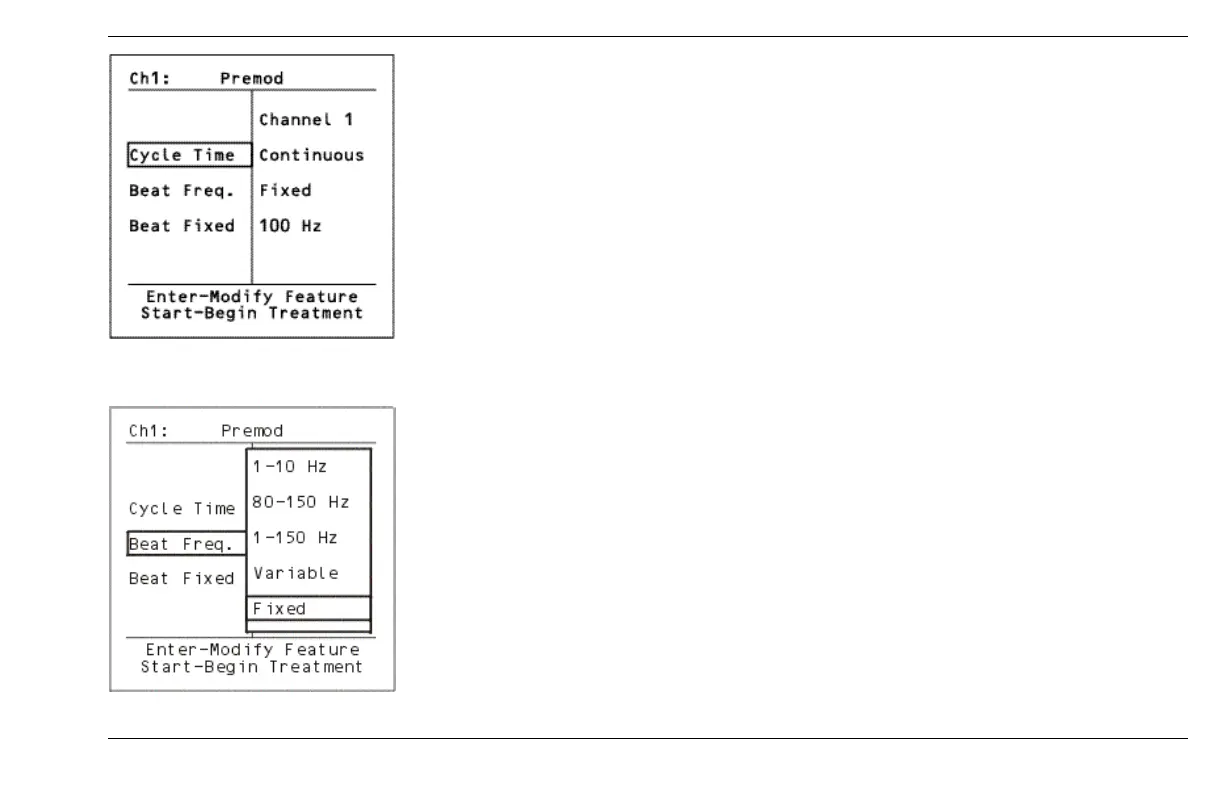
Cycle Time parameter controls the on/off cycle time of the current. There are 2 available options,
Continuous (default) and 5/5.
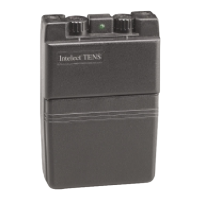
When you highlight Beat Frequency and press the ENTER button, 5 options are displayed. They are 1-10 Hz,
80-150 Hz (default), 1-150 Hz, Variable and Fixed.
The Variable option allows you to select a Low Beat frequency from 1-200 Hz and a High Beat
frequency from 1-200 Hz. To make changes in the Variable frequency, highlight VARIABLE and press the
ENTER button. To change the Beat Low frequency, use the DOWN arrow to highlight Beat Low and press
ENTER. Use the UP/DOWN arrows to adjust the frequency. Press ENTER to accept.
Beat Low describes the lowest frequency in the range of a sweep mode. For example when using a sweep of
80-150 Hz, 80 Hz is the lowest frequency.
Beat High describes the highest frequency in the range of a sweep mode. For
example when using
a sweep of 80-150 Hz, 150 Hz is the highest frequency.
The Fixed Option, allows you to select a fixed frequency from 1-200 Hz. To make changes to the Fixed
frequency, highlight FIXED and press ENTER. Use the UP/DOWN arrows to adjust frequency. Press ENTER to
accept.
Cycle Time
Fixed Option


 To Next Page