Need help?
Do you have a question about the Intelect NMES and is the answer not in the manual?
Defines neuromuscular stimulation and its applications.
Explains the mechanism of neuromuscular stimulation for preventing disuse atrophy.
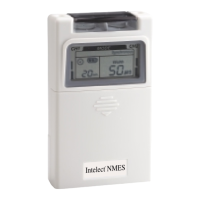
Describes the Intelect NMES unit as a system with miniaturized electronics.
Federal law restricts sale and use of the device to practitioners.
Lists the intended uses of the NMES device.
Lists critical warnings regarding stimulation application and effects.
Details precautions for specific patient conditions and usage scenarios.
Outlines possible side effects like skin irritation or allergic reactions.
Describes synchronous mode where both channels activate simultaneously.
Describes continuous mode with adjustable pulse rate and width, no ramp.
Describes alternative mode where channels activate sequentially.
Identifies controls and indicators on the front of the unit.
Identifies controls on the top of the unit for channel output.
Identifies components on the back of the unit like clip and battery cover.
Explains the function of the acrylic knob cover for protection.
Describes the panel covering controls like Mode, Set, Increase, Decrease.
Details how amplitude controls regulate intensity and act as ON/OFF controls.
Explains the function of the increase button for pulse width, rate, and timer.
Describes the function of the Decrease, Mode, and Set buttons.
Details what is displayed on the LCD screen regarding modes and parameters.
Specifies the type of battery used in the unit.
Instructions on how to insert a fresh 9V battery correctly.
Instructions for connecting electrodes to lead wires, ensuring no bare metal exposure.
Details on connecting lead wires to the unit's receptacles and using channels.
Instructions on applying electrodes to the skin for optimal contact.
How to adjust the output amplitude using the control knob.
Instructions on selecting the stimulation mode recommended by a physician.
How to adjust the ramp time for gradual muscle contraction.
How to adjust the contraction (ON) time for muscle stimulation.
How to adjust the relaxation (OFF) time between contractions.
How to adjust the pulse rate (frequency) of the stimulation.
How to adjust the pulse width (duration) of the stimulation.
How to set the treatment timer duration.
How to adjust amplitude for Channel 1 and Channel 2.
Steps to properly turn off the unit and unplug leads.
Explains how the unit records patient treatment time.
How to view cumulative treatment time records.
Describes the portability features of the unit for wearing.
Explains the low battery warning indicator.
Instructions for replacing the 9V battery.
How to clean and care for silicone rubber electrodes.
How to clean and maintain electrode cords.
Lists recommended actions for using and maintaining the device.
Lists prohibited actions to avoid damage or misuse.
Advice on how to handle and store the device.
Lists the items included with the NMES unit.
Steps to take if the LCD is on but the unit doesn't function.
Action to take when the low battery indicator flashes.
Steps to take if no LCD indicators light up.
Details the warranty duration for the unit.
Details the warranty duration for accessories.
 General
| Pulse Rate | 1-150 Hz |
|---|---|
| Amplitude | 0-100 mA |
| Pulse Width | 50-400 microseconds |
| Channels | Dual |
| Modes | Continuous, burst |

 To Next Page