Courtesy of Main Resource, Inc. Visit us at www.MainResource.com or call 800 362-6740 for all your
Inter-Tel needs.
Page 9 of 23
Default Message New Message Default Message New Message
01 DO-NO-DISTURB 11 OUT OF TOWN ‘TIL
02 LEAVE A MESSAGE 12 OUT OF OFFICE
03 IN MEETING UNTIL 13 OUT UNTIL
04 IN MEETING 14 WITH A CLIENT
05 ON VACATION ‘TIL 15 WITH A GUEST
06 ON VACATION 16 UNAVAILABLE
07 CALL ME AT 17 IN CONFERENCE
08 AT THE DOCTOR 18 AWAY FROM DESK
09 ON A TRIP 19 GONE HOME
10 ON BREAK 20 OUT TO LUNCH
Because the display phones use only one line to show the above messages you may enter a
second line of text up to 16 characters. For example, if you select message 13 “OUT UNTIL”, you
can enter “1:15” as your second line. Callers with a display will see, “OUT UNTIL 1:15”.
To use Do-Not-Disturb
1. Press DND.
2. Dial the two-digit number for the message you want to use or press the up or down arrow
keys to scroll through the messages (display phones only).
3. If desired, customize the second display line by dialing the desired numbers or letters as
described below:
• For numbers only, press the keypad keys to dial the desired numbers. Press “#” for “-“,
“*” for “:”, FWD to leave a space or MUTE to backspace
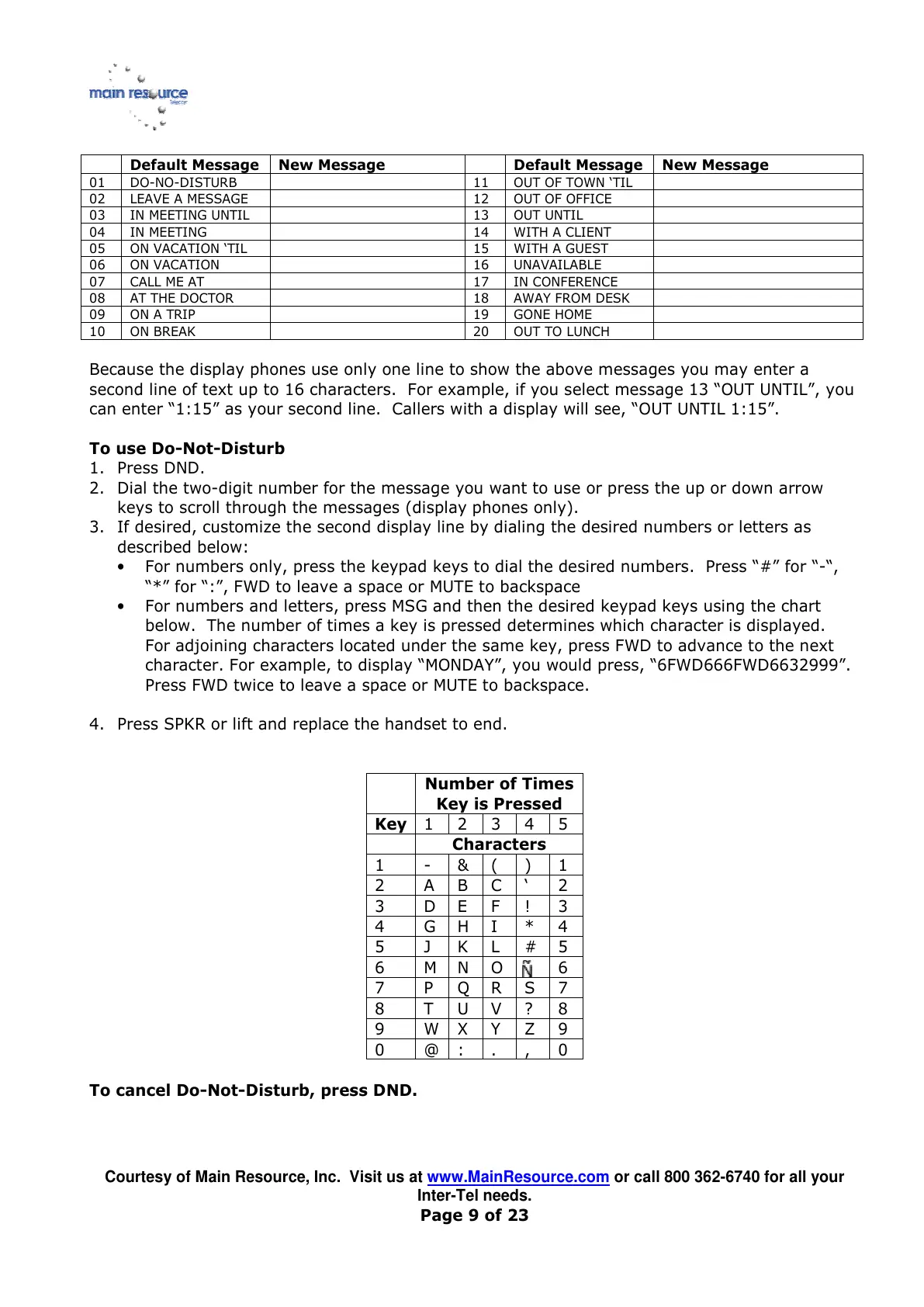
• For numbers and letters, press MSG and then the desired keypad keys using the chart
below. The number of times a key is pressed determines which character is displayed.
For adjoining characters located under the same key, press FWD to advance to the next
character. For example, to display “MONDAY”, you would press, “6FWD666FWD6632999”.
Press FWD twice to leave a space or MUTE to backspace.
4. Press SPKR or lift and replace the handset to end.
Number of Times
Key is Pressed
Key



 To Next Page