D-0120588-B – 2019/03
Eclipse – Instructions for Use - EN Page 90
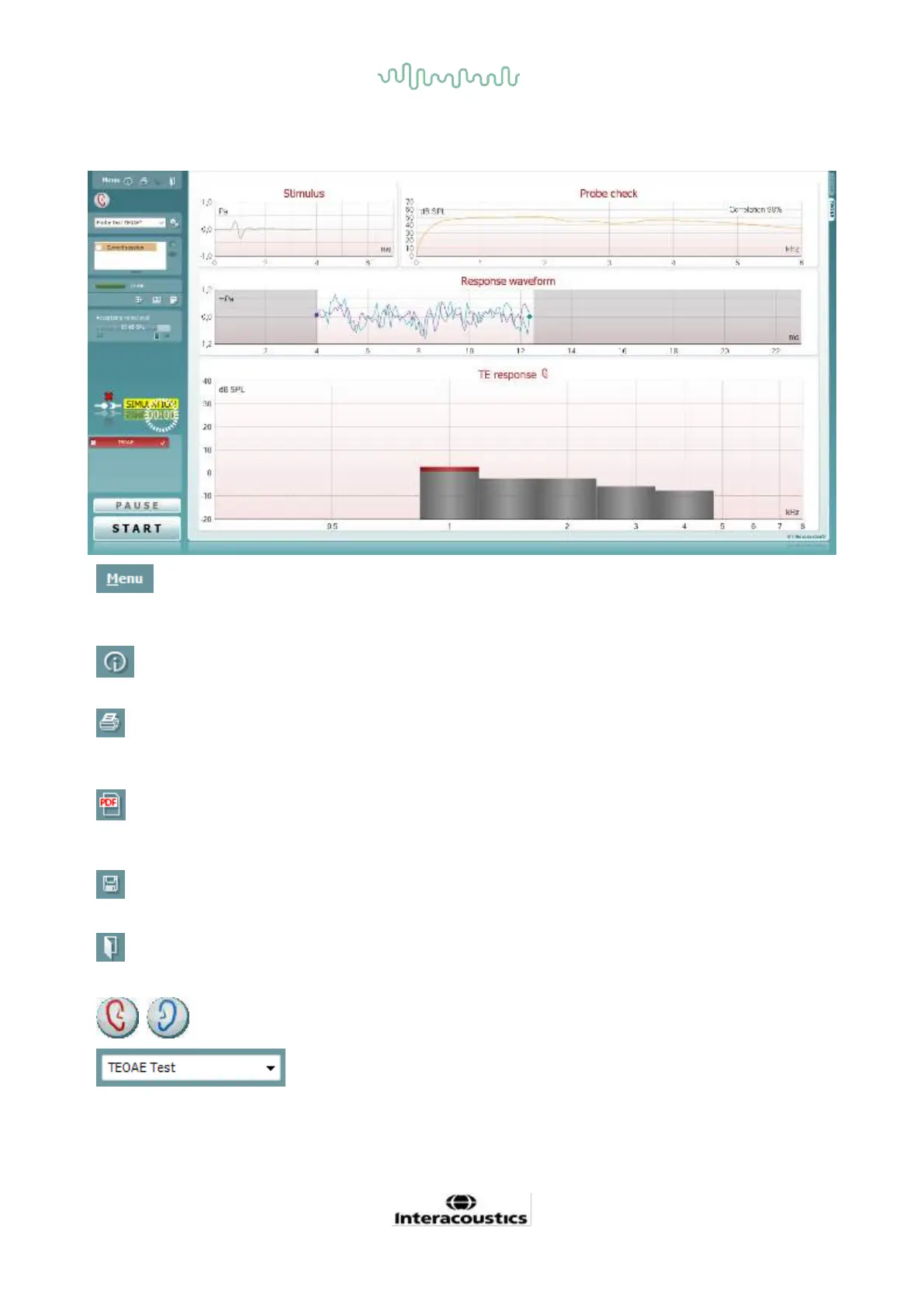
7.5.2 Element in the TEOAE module
The following section describes the elements of the TEOAE screen.
Menu provides access to Setup, Print, Edit or Help (refer to the
Additional Information document for more details about the menu
items).
Guidance button opens the user guide which shows instructions
for testing within the module. The guidance can be personalized in
the User guide setup window.
Print allows for printing the onscreen results directly to your default
printer. You will be prompted to select a print template if the
protocol does not have one linked to it (refer to the Additional
Information document for more details about the print wizard).
Print to PDF icon appears when setup via the General Setup. This
allows for printing directly to a PDF document that is saved to the
PC. (Refer to the Additional Information document for setup
information).
Save & New Session saves the current session in Noah 4 or
OtoAccess® (or to a commonly used XML file when running in
standalone mode) and opens a new session.
Save & Exit saves the current session in Noah 4 or OtoAccess®
(or to a commonly used XML file when running in standalone
mode) and exits the OAE software.
Toggle Ear changes from right to left ear and vice versa in all
modules.
List of Defined Protocols allows for selecting a test protocol for
the current test session (refer to the Additional Information
document for more details about protocols).














 To Next Page