Affinity
2.0
Additional Information Page 105
Common
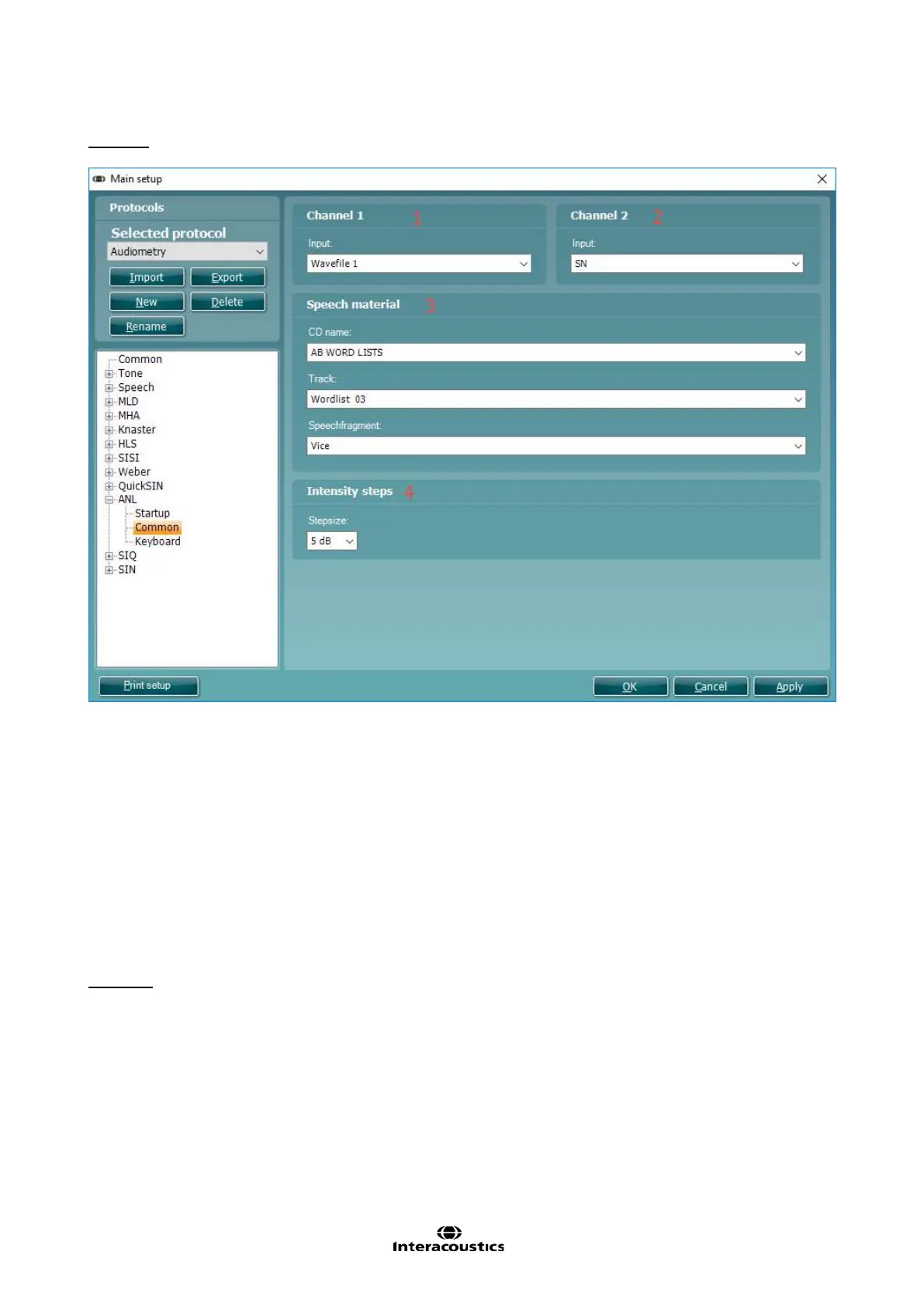
To enter the Common options for ANL testing unfold the ANL options and click Common.
1) Select your desired Channel 1 input via the Input dropdown list.
2) Select your desired Channel 2 input via the Input dropdown list.
3) Choose your Speech Material via this section. The CD chosen corresponds to material which is already
available in your Speech Audiometry test screen. This requires that the material has been extracted via
the speech extraction tool.
The dropdown allows you to choose your CD Name but also the Track and individual Speech Fragment
you wish to use.
It is important for the running of the test that each dropdown has been selected.
4) Choose your Intensity steps via this section. This will alter the step size you can change your stimulus
by.
Keyboard
To enter the Keyboard options for ANL testing unfold the ANL options and click Keyboard. Since the
procedure for setting up the audiometry keyboard buttons for ANL testing is identical to the procedure for the
setting up keyboard buttons for tone audiometry, please see section 1.7.2.2 for a description.



 To Next Page