Affinity
2.0
Additional Information Page 71
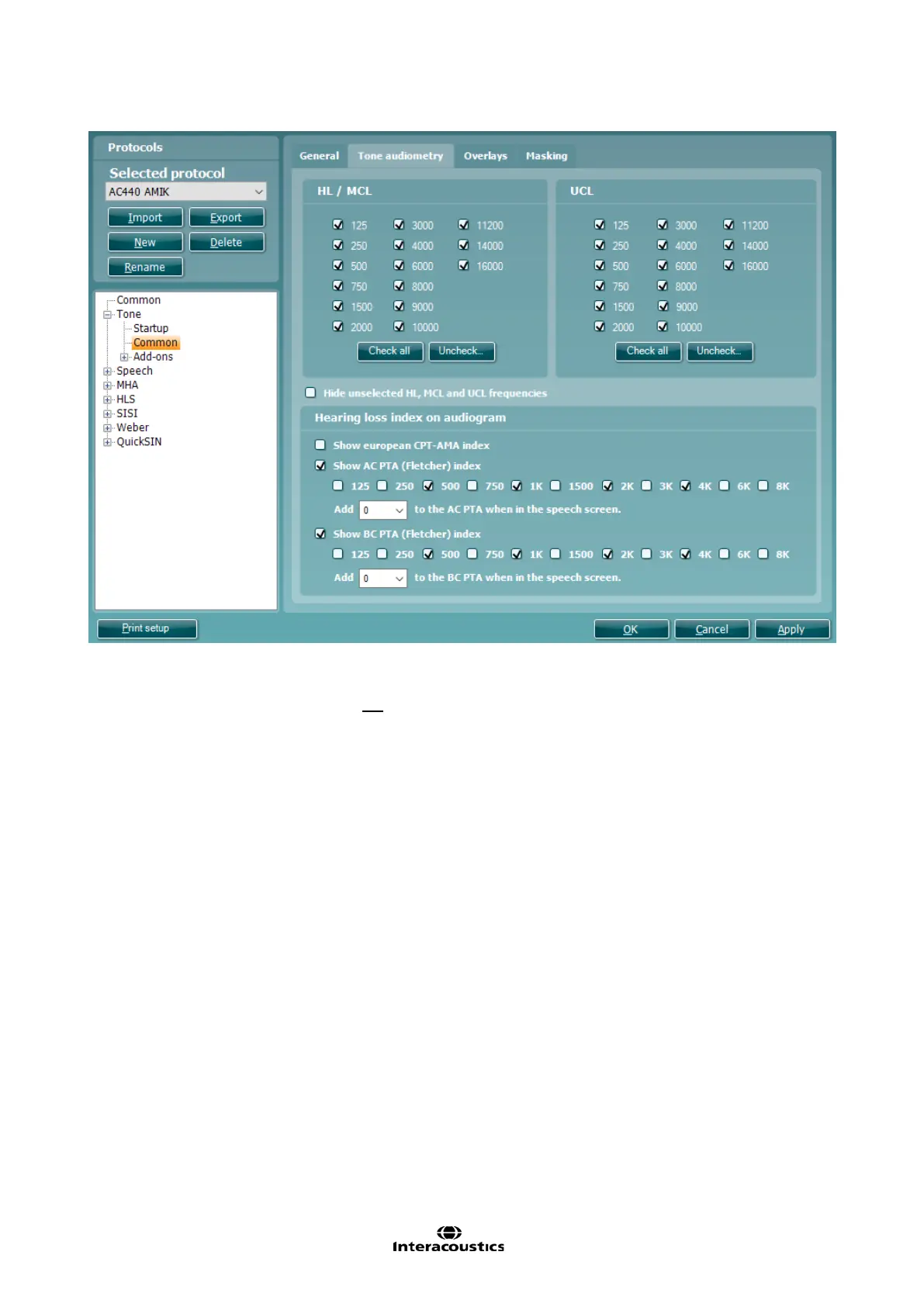
17) Under the Tone audiometry tab you can select the desired test frequencies for HL/MCL and UCL by
ticking the preferred frequencies. Use the Check all or Uncheck all buttons to help if needed.
If the unselected frequencies are not to be visible on the graph then also tick Hide unselected HL,
MCL and UCL frequencies. This way only the selected frequencies will appear on the audiogram.
18) The Hearing loss index on audiogram allows for ticking Show European CPT-AMA index, Show AC
PTA (Fletcher) index or Show BC PTA (Fletcher) index. The European CPT-AMA is calculated using
the values from the table below which ensures that the different frequencies are weighted to display a
correct quantification of impairment due to the hearing loss. The dropdown menu below these settings
for PTA (Fletcher) index indicate the amount of additional decibels you wish to add to the threshold
when entering speech for the initial stimulus level.



 To Next Page