Need help?
Do you have a question about the Interfit S1 and is the answer not in the manual?
Overview of the S1's unique combination of features for versatile lighting.
Essential safety precautions for handling the flash unit to prevent hazards.
Details on the one-year warranty and customer service contact information.
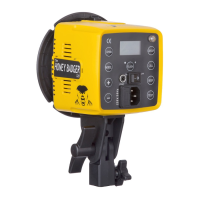
Identification of key external components and their locations on the flash unit.
Description of buttons and displays for controlling flash functions and settings.
Details on light stand mount, umbrella mount, sync port, and AC power port.
Instructions for removing and replacing the protective shipping cover.
Attaching and using Bowens mount modifiers like softboxes and umbrellas.
Using sync cables and Interfit/third-party remotes for flash triggering.
How to power the unit and adjust flash power output across its range.
Adjusting the intensity and turning the LED modeling lamp on/off.
Configuring channels and groups for remote control and multi-light setups.
Selecting manual/TTL modes and sync modes (first, second, HSS).
Operating the flash at high shutter speeds, including power limitations.
Using TTL for automatic exposure and understanding the double beep indicator.
Procedures for charging the battery and mounting the unit to a light stand.
Instructions for replacing the flash tube and frosted glass dome.
Steps to check and update firmware for optimal communication.
Detailed technical data including power, range, sync speed, and dimensions.
 Power Specifications
| max watt seconds | 500Ws |
|---|---|
| power range | 500Ws – 1.9Ws |
| guide number | 148 (100 ISO, 1/125, 1 meter, 7” reflector) |
| variability | 1/10th stop increments |
| recycle time | 3 seconds at full power |
| flash duration | 1/900 at full power |
Light and Color| color temperature | 5700K +/- 100K |
|---|---|
| modeling lamp | 10w LED (Proportional) |
Shooting Modes and Sync| shooting mode | Manual, TTL, HSS |
|---|---|
| max sync speed | 1/250 sec. Manual, 1/8000 sec. HSS |
| wireless control | Yes |
Physical Characteristics| fan cooled | Yes |
|---|---|
| auto dump | Yes |
| temperature regulation | Yes |
| umbrella mount | Fits umbrella shafts up to 5/8”(8mm) |
| dimensions | 13.4” × 9.1” × 5.1” |
| weight | 6.3 lbs |

 To Next Page