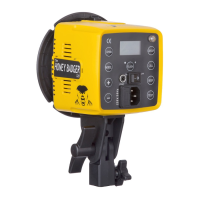
Using Your S1
Powering Up Your S1
There are two ways to power your S1. To use the battery power, simply insert the battery to the battery
compartment of the ash head and turn the power switch to DC. To use an AC power supply, plug in the AC
converter included with the light to the underside of the unit and plug into a grounded power outlet. Turn the
power switch on the light to AC. The S1’s AC converter is multi-voltage, meaning it can be used either on 110V/
60Hz or 220V/50Hz.
NOTE: The AC power mode can be used with or without the battery in place. The battery will not charge
in the light and must be charged with the included battery charger. This prolongs the battery life cycle
as it is not constantly discharged and recharged while in AC mode.
Adjusting the Power
Your S1 is packed with 500Ws of power. This power is adjustable over a 9-stop range and can be adjusted in
1/10th of a stop intervals. Power can be adjusted using an Intert TTL or Manual Remote, or using the power
adjustment dial on the back of the light. Power can be adjusted from 10.0 (500Ws - full power) to 2.0 (1.9Ws -
lowest power) in manual mode. Power is displayed on the LCD screen. When in HSS mode, the power will only
adjust from 10.0 (full power in HSS) to 8.0 (lowest power in HSS).
Using the Test Function
The Test button will illuminate blue when the ash is charged and ready for use. The blue indicator light will
turn off immediately after the ash has red, and turn on again once the light has fully recycled. Recycle is also
indicated by an audible beep when the Beep function is enabled.
Using the Modeling Lamp
To use the 10w LED modeling lamp, press the MODEL button on the back interface of the S1 to toggle through
two different modeling lamp intensities or turn it off.
50% - Toggle the modeling lamp to 50% for half of the modeling lamp power.
100% - Toggle the modeling lamp to 100% to use the modeling lamp on full power.
Setting Channels
**Setting the control channel is only necessary when using the Intert Remotes. If you are using a third-party radio
system or optical slave, you can skip this section. When using the Intert Manual Remote, 15 channels will show, but
only the rst 8 can be used with the S1.
Having 8 unique radio control channels allows you to use your lights in close proximity with another
photographer without interfering with one another. Press the CHANNEL button to toggle through the 8 available
isolated channels. Make sure the channel selected on your S1 matches the selected channel on your Intert
Remote.
www.intertphotographic.com 6
MODEL
TEST
CH


 To Next Page