Setting Groups
**Setting the control group is only necessary when using the Intert Remotes. If you are using a third-party radio
system or optical slave, you can skip this section. When using an Intert Manual Remote, 8 groups will show, but only
groups A-C can be used with the S1.
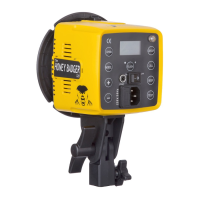
Setting the control group allows you to independently control the power of each light in your setup without
affecting your other lights. Your S1 can be set to three different control groups (A, B, C). Press the GROUP button to
assign your light to it’s own group.
Beep Button
Press the BEEP button to turn off the audible sound for buttons, power adjustments and recycle notications.
Optical Slave Cell
When using third-party lights with your S1 and a sync cord or a third-party remote, turn on the CELL button to
activate the optical slave function. This will allow the light to be triggered by the ash pulse from other ashes.
NOTE: Using the Optical Slave Cell requires direct line of sight, close proximity, and low ambient
light. Optical slave cells do not work well in bright sunlight.
Shooting Modes
When shooting with the Intert TTL Remote, select from a manual shooting mode or TTL (Through the Lens) mode.
P r e s s t h e b u t t o n b e n e a t h “ M o d e ” o n t h e r e m o t e L C D s c r e e n t o t o g g l e b e t w e e n s h o o t i n g m o d e s .
Sync Modes
When shooting with the Intert TTL Remote, select from three different sync modes. Press the button beneath
“Sync” on the remote LCD screen to toggle the sync mode to rst curtain, second curtain or HSS.
NOTE: Nikon users switch between 1st- and 2nd-curtain sync via the camera and enable HSS by
increasing the shutter speed on their camera with Auto FP mode enabled.
Using HSS (High Speed Sync)
Use the Intert TTL Remote to toggle the shooting mode of your S1 to HSS. This shooting mode will allow you to
use the S1 at shutter speeds of up to 1/8000th of a second. In HSS mode, power range is limited to 8.0-10.0.
NOTE: These power output levels do not directly correlate with power levels in standard sync
mode. There will be a noticeable decrease in light output as HSS uses a series of low power ashes
allowing for correct exposures at high shutter speeds.
Using TTL (Through the Lens Metering)
TTL (through the lens metering) is an automatic ash exposure that is predetermined by your camera settings,
internal light meter and various other factors. TTL is most useful in rapidly changing environments.
When the TTL shooting mode is selected with the Intert TTL Remote, power adjustment on the remote will change
to a +/- display. The light output will be automatically set by the camera but can be ne-tuned using exposure
compensation. Exposure compensation can be set using the +/- power buttons on the remote. Adjustments can be
made in 1/10th stop increments up to +3 or -3 stops.
www.intertphotographic.com 7
BEEP
CELL
GROUP


 To Next Page