10 Enhanced Mobile Document Imaging (eMDI) User Guide
Capture a Document Image with the Camera
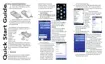
Use the camera to easily capture a document image with the CN51 or
70 Series mobile computers.
1 Place your document on a flat surface. Make sure that there is
good contrast between the document and surface.
2 Tap Start > Document Imaging.
3 Point and hold the camera at a 90º angle and a few inches away
from the document.
4 Press the Scan button. The video preview and viewfinder frame
appears.
The viewfinder frame pulses as it tries to detect the document
edges.
5 Align the viewfinder frame with the document edges by moving
the camera. When the viewfinder frame detects the document
edges, the viewfinder frame turns white and a red target appears.



 To Next Page