25
Operating Adjustments
Range Adjustment
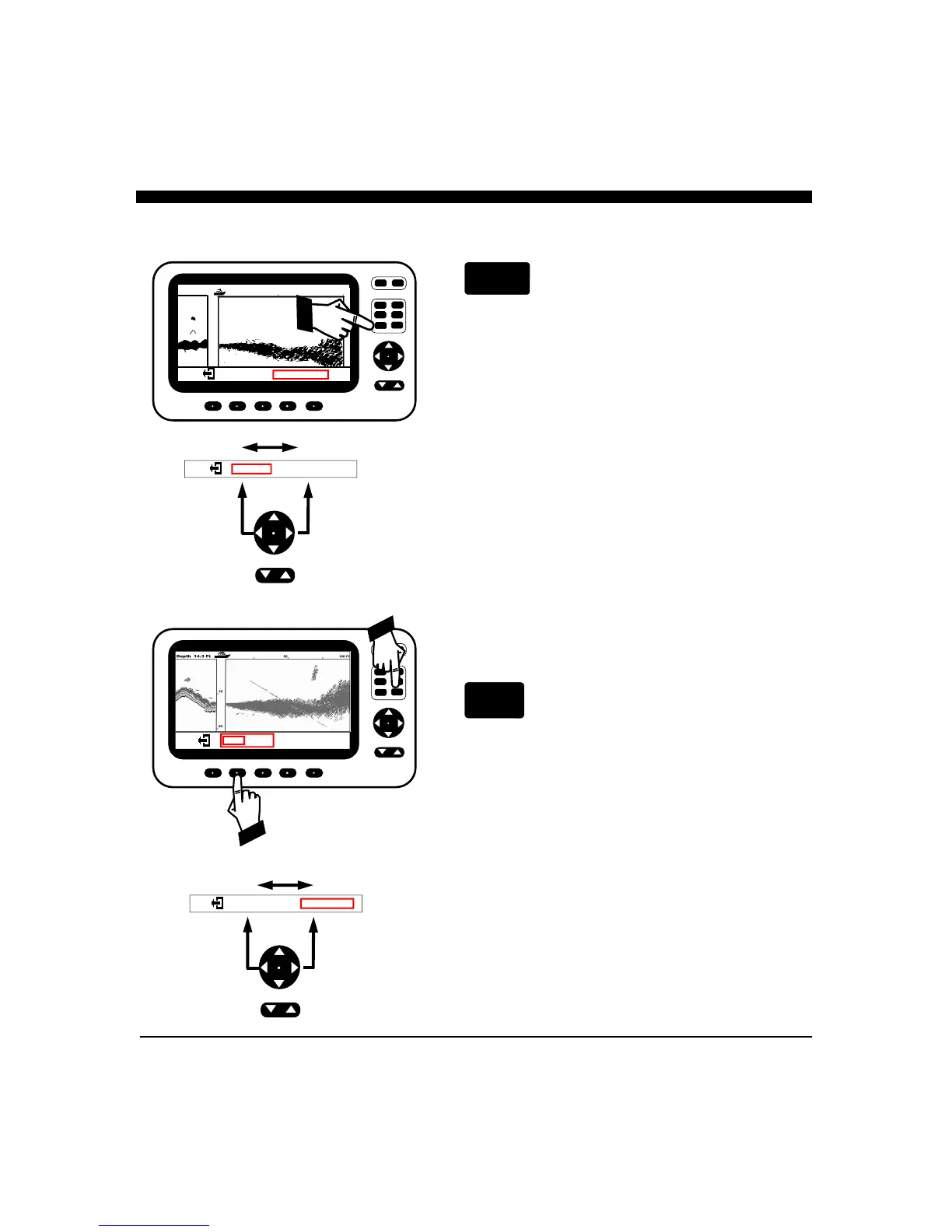
To change the Depth or Forward Range, press the button
labeled RANGE to bring up the Range Adjustment soft key
menu. You can use the NAV or UP/DOWN button to adjust
the RANGE upwards or downward.
If you are in one of the split screen modes with the DOWN
looking depth showing on the left, you can adjust the
downlooking depth range (Down) and/or the forward
looking scanning range. To adjust the downlooking depth
range, press the left side of the NAV button to select the
DOWN depth adjustment (a red box will indicate it is
selected). To adjust the range up or down, use the NAV
Button or the UP/DOWN button.
To adjust the forward looking Range, use the Right side of
the NAV button to select the SCAN range adjustment (a red
box will indicate it is selected). To adjust the range up or
down, use the NAV button or the UP/DOWN button.
When finished, press the EXIT softkey or allow the menu to
time-out after a few seconds.
Gain Adjustment (Sentivity)
Press the button labeled GAIN to bring up the choices
available for adjusting the iScan V90's receiver GAIN. Press
the button below AUTO so that the word AUTO is shown
with a red border if you would like the Color Twinscope to
automatically adjust its receiver gain for changing conditions.
To manually adjust press the on the NAV or UP/
DOWN button to increase or decrease the receiver gain. Note
that the GAIN MENU shows a number which indicates the
relative sensitivity being used (+1 to +32). When you choose
to manually adjust the GAIN, the Color Twinscope turns off
the AUTO mode and it will remain off until the AUTO soft
key is again selected. Note: when AUTO mode is turned on
the word will be displayed with a red border. . To exit the
GAIN MENU and save your adjustments simply press the
exit symbol or allow the menu to time-out (approx. 12
seconds)
CURSR
VERT
VIDEO
DOWN
DATA
RANGE
GAIN
PWR
FORWARD LOOKING SONAR
13.2 Ft
18
37
25
12.5
DEPTH: 25
FWD RANGE: 50
DEPTH: 25
FWD RANGE: 50
AUTO 31 DOWN
AUTO 15 SCAN
CURSR
VERT
VIDEO
DOWN
DATA
RANGE
GAIN
PWR
FORWARD LOOKING SONAR
13.2 Ft
18
37
25
12.5
31 DOWN
AUTO 15 SCAN
AUTO
Setting AUTO mode.
Use NAV
buttons to change
from Depth to
Forward Range
Adjustment.
Use NAV
buttons to change
from Down to
Forward Scan
Gain Adjustment.



 To Next Page