27
Scanning Speed
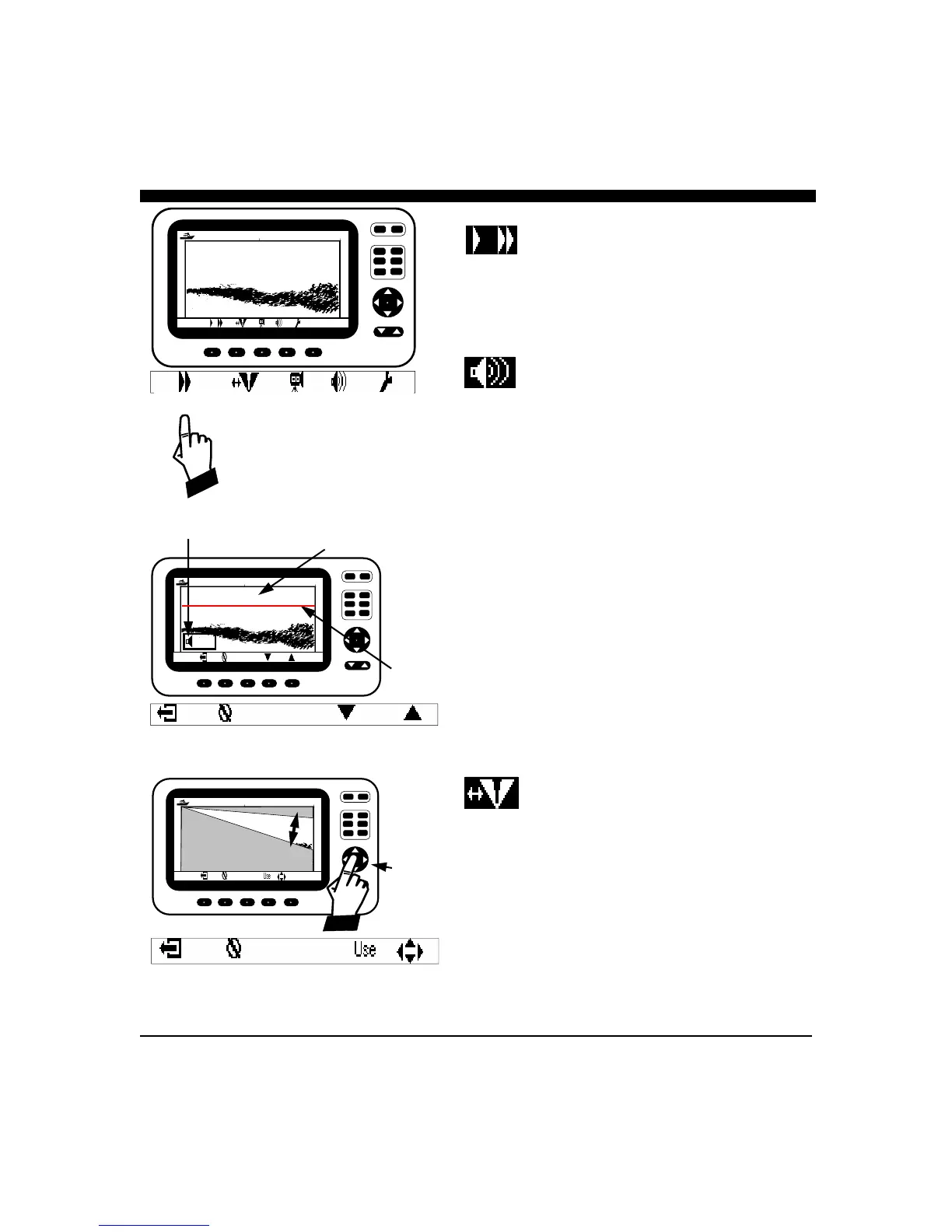
The iScan V90 has two scanning speeds. Fast - indicated
with two right facing triangles (
), and slow, indicated
with one right facing triangle(
). In the faster mode, the
display resolution is reduced because the number of
scanning samples is reduced.
Alarm Adjustment
A forward looking alarm can be set in the downlooking or
the forward vertical scan modes. When the alarm is set, a
red “alarm” line and an alarm depth box appears on the
display to indicate the alarm setting and the fact that it is
active.
In the vertical scan mode, the alarm will sound if a target
appears above the alarm line. In the horizontal scan mode,
the alarm will sound if a target is closer to the boat than the
alarm line. See diagrams at left.
To set the alarm, press any of the five unmarked softkeys
below the display to bring up the softkey menu. Then, press
the softkey beneath the ALARM symbol to bring up the
ALARM MENU.
To adjust the alarm setting, use the buttons below the
symbols in the ALARM MENU, or the NAV or UP/
DOWN button. Press the softkey button below the EXIT
symbol to save the setting and exit, or press the button below
the CLEAR symbol to disable the ALARM and exit.
Beam Adjustment
The iScan V90 can scan a 90 degree arc (segment) in a
vertical direction. In some cases you may want to reduce
the size of the sector and then steer it in a particular
direction. Reducing the sector size is one way to increase
the scanning speed, as time isn’t spent scanning unwated
areas.
To adjust the beam, press any of the five unmarked softkeys
below the display to bring up the softkey menu and
thenpress the softkey beneath the BEAM symbol to bring up
the BEAM MENU.
CURSR
VERT
VIDEO
DOWN DATA
RANGE
GAIN
PWR
FORWARD LOOKING SONAR
Use NAV
Button
UP/Down
to
adjust
beam
sector
EXIT CLEAR
Targets On This Side of Line
Will Cause Alarm to Sound
Alarm
Line
Alarm Setting
CURSR
VERT VIDEO
DOWN
DATA
RANGE
GAIN
PWR
FORWARD LOOKING SONAR
Depth 13.2 Ft
25 50
25
12.5
5 Ft
EXIT CLEAR DOWN UP
CURSR
VERT
VIDEO
DOWN
DATA
RANGE
GAIN
PWR
FORWARD LOOKING SONAR
Depth 13.2 Ft
25 50
25
12.5
Scan Speed Beam Adj Video Alarm Set-up



 To Next Page