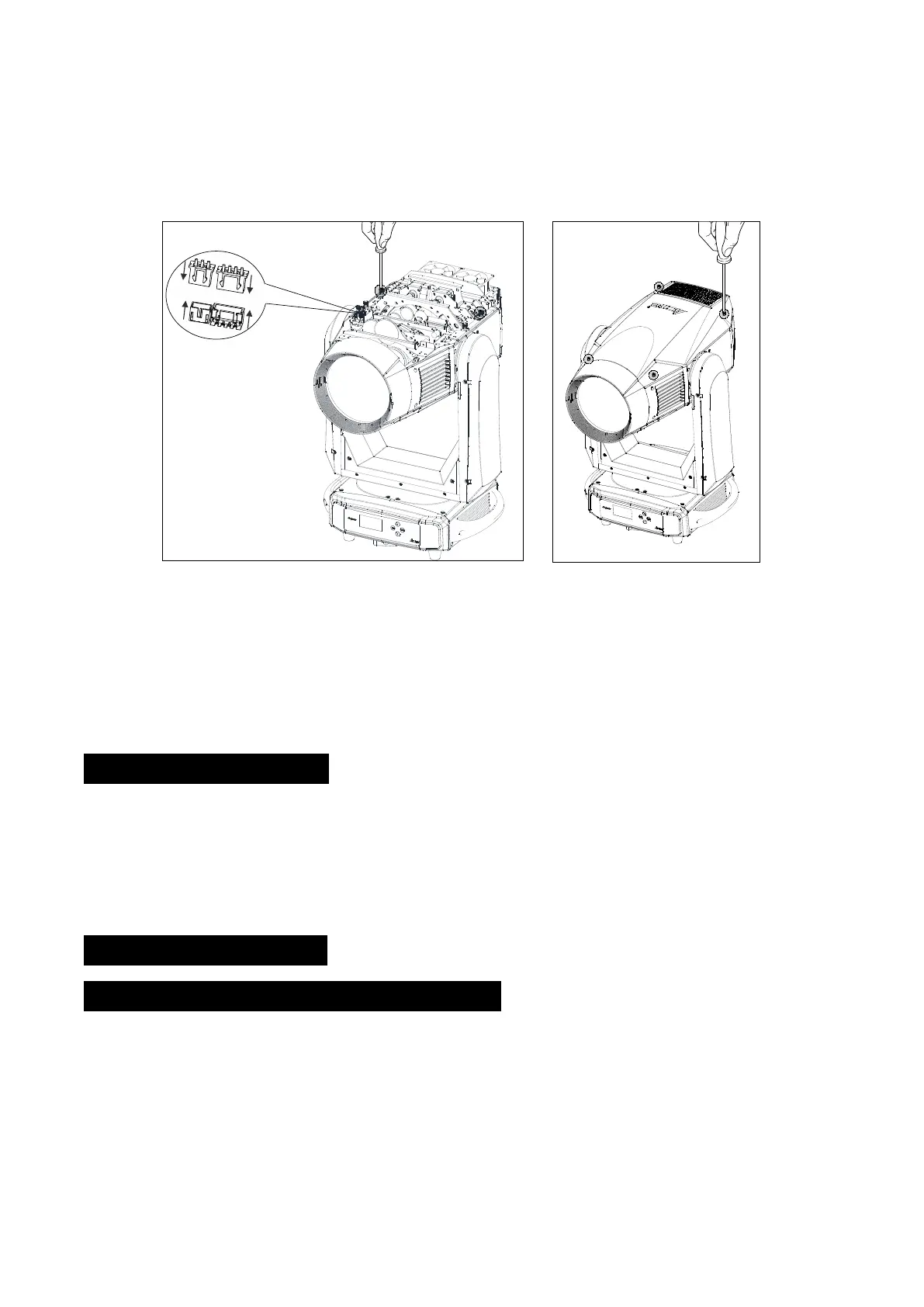
Grasp the modules using the support structure to avoid damage to the fixture, gently remove
the module along the direction of the arrow.
Gently place the Gobo module into the recess along the direction of the arrow.
Tighten 2 screws on both sides of the Gobo module and connect the wiring harnesses.
Reinstall the cover before reapplying power.
(Do not disconnect wiring harnesses when the fixture is switched on, to avoid to damage electronic
board)
4. How To Set The Unit
This fixture has two kinds of modules, Gobo module and Animation module, easy to be replaced.
After changing the modules, the program will automatically recognize and switch the current
module.
4.1 Animation Module
4.1.1 Animation Module Main Function
Turn on the unit, press the MENU button into menu mode, and press the UP/DOWN button until
the required function is shown on the monitor. Select the function by the ENTER button. Use the
UP/DOWN button to choose the submenu, press the ENTER button to store and automatically
return to the last menu. Press the MENU button or let the unit idle 30 seconds to exit menu mode.
The main functions are shown below:
9F


 To Next Page