Da Vinci Firefly Imaging System User Manual Addendum 552064-10 Rev. A
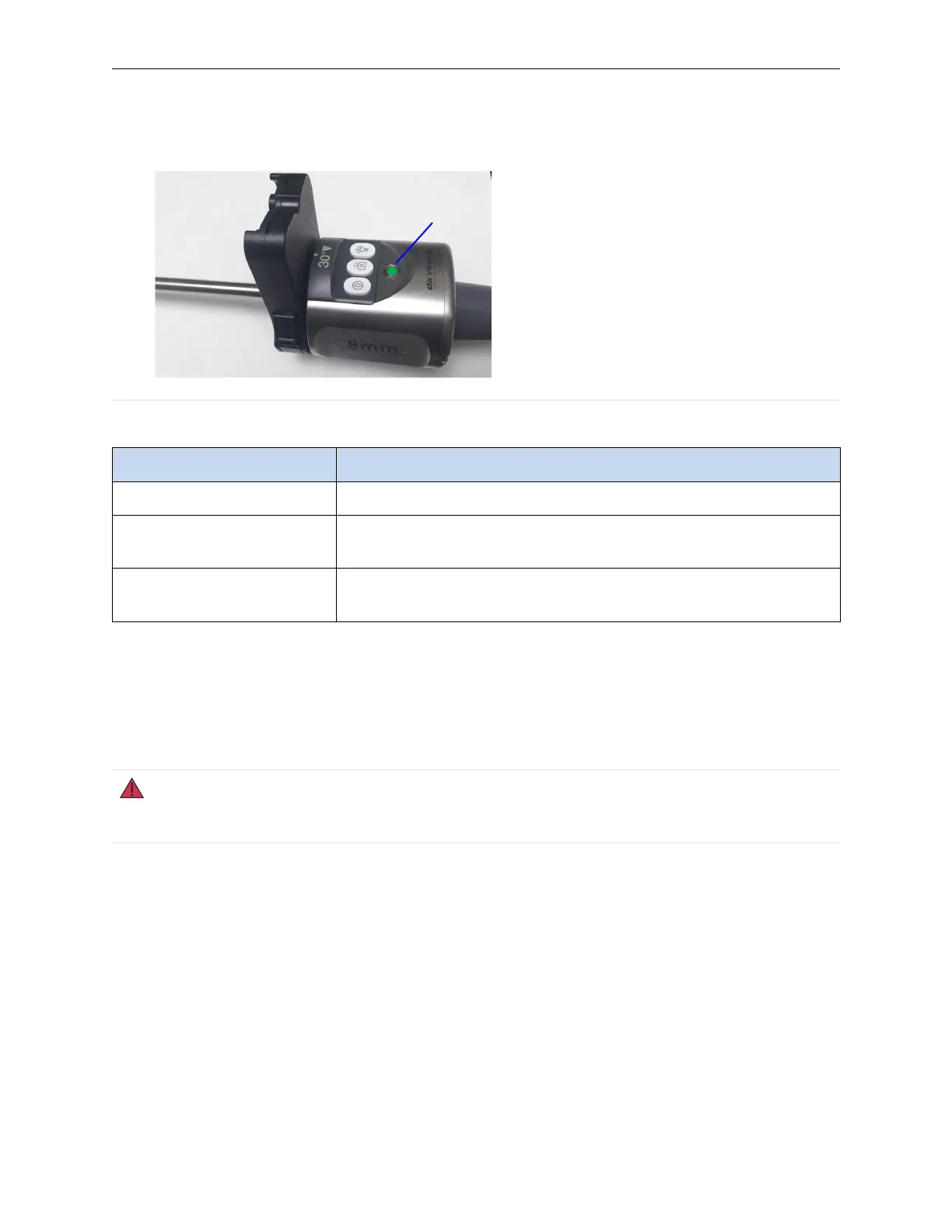
Figure 5 Endoscope LED (example)
1. Endoscope LED
Table 4 Endoscope LED
Endoscope LED Status
Off Endoscope is not connected to the Endoscope Controller.
Green, Flashing Endoscope is connected to the Endoscope Controller and the
system is loading calibration data.
Green, Steady Endoscope is connected to the Endoscope Controller and cali-
bration data is fully loaded.
Laser On LED
When Firefly imaging is active, the “LASER ON” LED indicator (Figure 6) on the back of the
endoscope illuminates a solid green color. This indicates that the endoscope tip is emitting laser
light. The illumination from the tip of the endoscope visually appears blue in color in Standard
mode. There is no visible illumination from the tip in Sensitive mode.
WARNING: Avoid looking into the tip of the endoscope when the LASER ON indicator is lit
green. Invisible near-infrared laser light is being emitted from the tip. Failure to observe this
warning could result in eye injury.
10
System Overview | Indicators


 To Next Page