Da Vinci Firefly Imaging System User Manual Addendum 552064-10 Rev. A
Image Adjustment on Surgeon Console
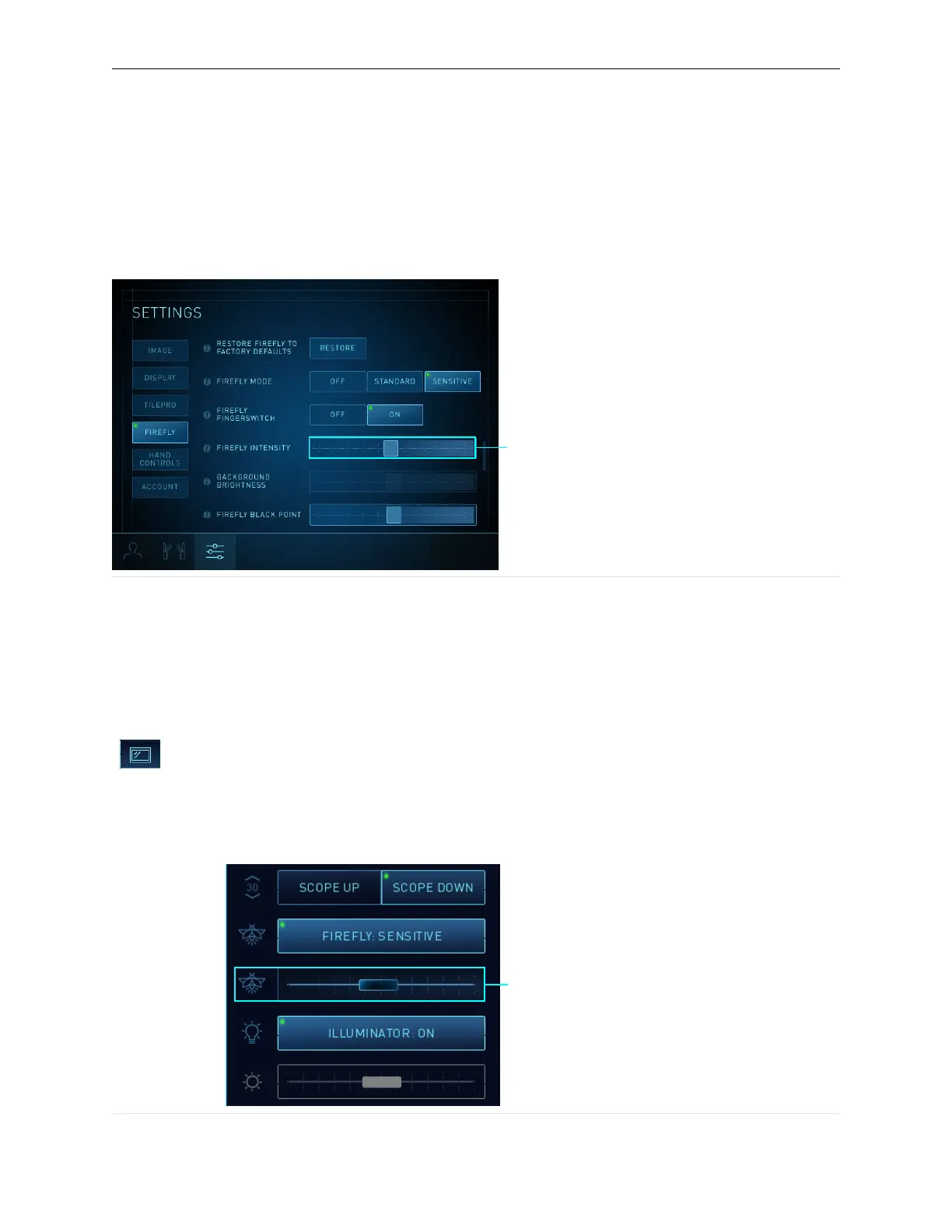
Firefly Intensity Slider
Drag the Firefly Intensity slider to adjust the intensity of the green fluorescent signal. Moving it to
the right progressively increases the intensity of the fluorescent signal (appears more saturated).
Figure 29 Surgeon Console Firefly Intensity slider, in Sensitive mode (example)
1. Firefly Intensity slider
See Firefly Imaging Operation on page 12 and Image Adjustment on Surgeon Console on page 19 for
general instructions on using the Firefly Intensity slider on the Surgeon Console touchpad.
Image Adjustment on Vision Cart Touchscreen
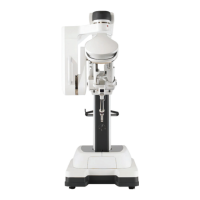
Firefly Intensity Slider
Touch the Display tab and move the Firefly Intensity slider to adjust the intensity of the
green fluorescing image and change the contrast between the fluorescing image and
non-fluorescing image. This slider is disabled in visible light mode.
Figure 30 Vision Cart Firefly Intensity slider, in Sensitive mode (example)
1. Firefly Intensity slider
Sensitive Mode Operation | Adjust Image in Sensitive Mode
29


 To Next Page