da Vinci SP Instruments and Accessories
Using the Electrosurgical Unit (ESU) with Monopolar and Bipolar Instruments
41
DRAFT/PRE-RELEASE/CONFIDENTIAL
12/5/19
Note: The VIO dV auxiliary foot pedals (bipolar and monopolar) are connected to
the VIO dV and are located in the bottom drawer of the Vision Cart.
Figure 8.1 VIO dV
Loading Screen
Press the Power button on the lower left side of the VIO dV to turn it on. The Loading screen
appears.
Main Screen
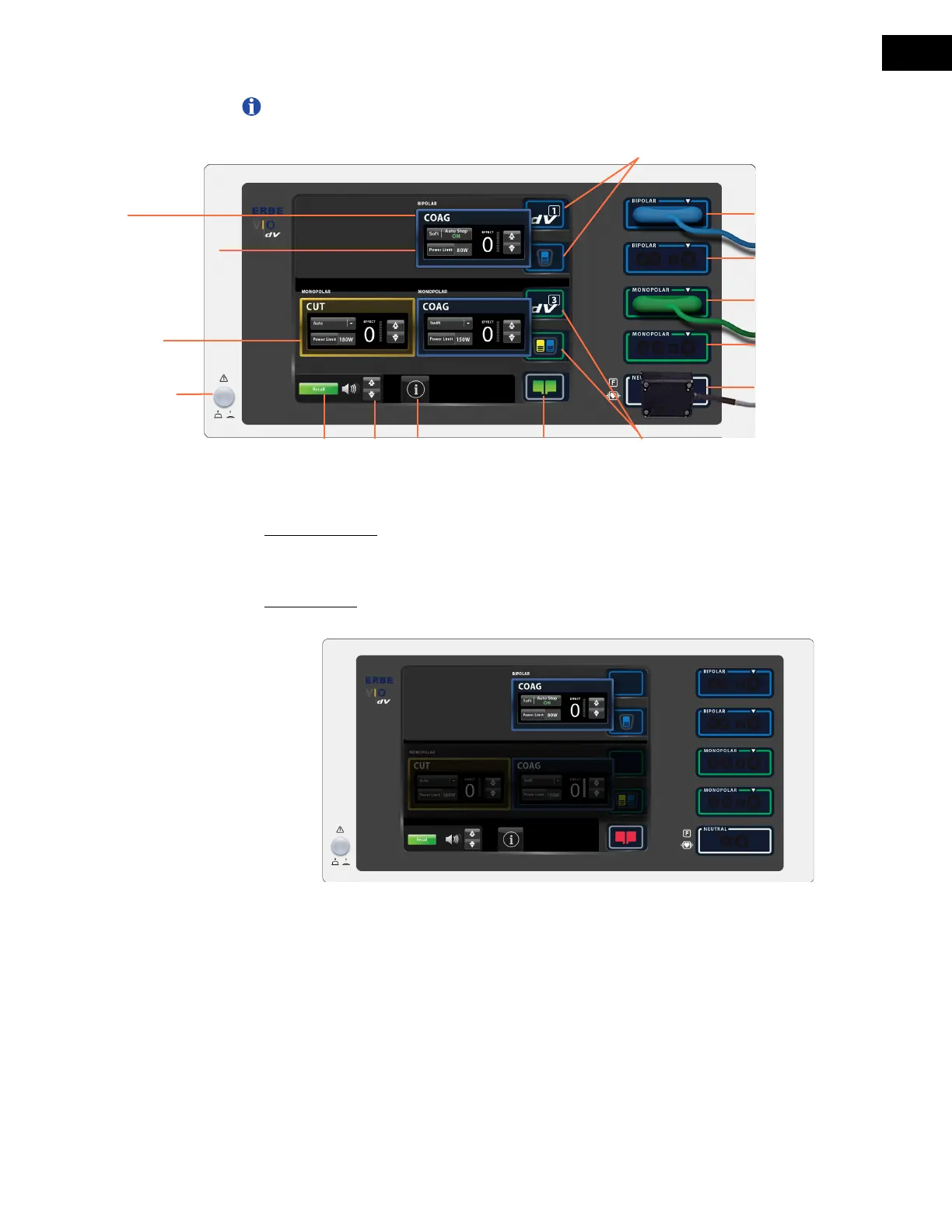
The Main screen displays the default settings shown in Figure 8.2.
Figure 8.2 Main screen with default settings displayed
Bipolar mode pod
COAG
Monopolar mode pods
CUT & COAG
Power button
Recall Volume
control
Help
menu
Patient neutral
pad status (NESSY)
Bipolar port 1
Assignment indicators (bipolar)
Monopolar port 2
Monopolar port 1
Neutral port
Assignment indicators
(monopolar)
Bipolar port 2
Power limit selection
and display


 To Next Page