Using the Electrosurgical Unit (ESU) with Monopolar and Bipolar Instruments
da Vinci SP Instruments and Accessories
42
DRAFT/PRE-RELEASE/CONFIDENTIAL
12/5/19
Selecting VIO dV Settings
After the VIO dV is powered on, the default effect settings will be zero and must be increased
to activate energy. Settings can be selected by recalling previous monopolar and bipolar
settings, or by manually adjusting the settings. With either selection method, set the effect as
low as possible relative to the desired surgical effect. When used with the da Vinci SP System,
the VIO dV limits energy settings to those approved for EndoWrist SP monopolar instruments
(see Table 8-1).
Recall Previous Settings
Note: Recalling previous settings is only possible after the ESU is initially powered
on, and before settings are manually adjusted.
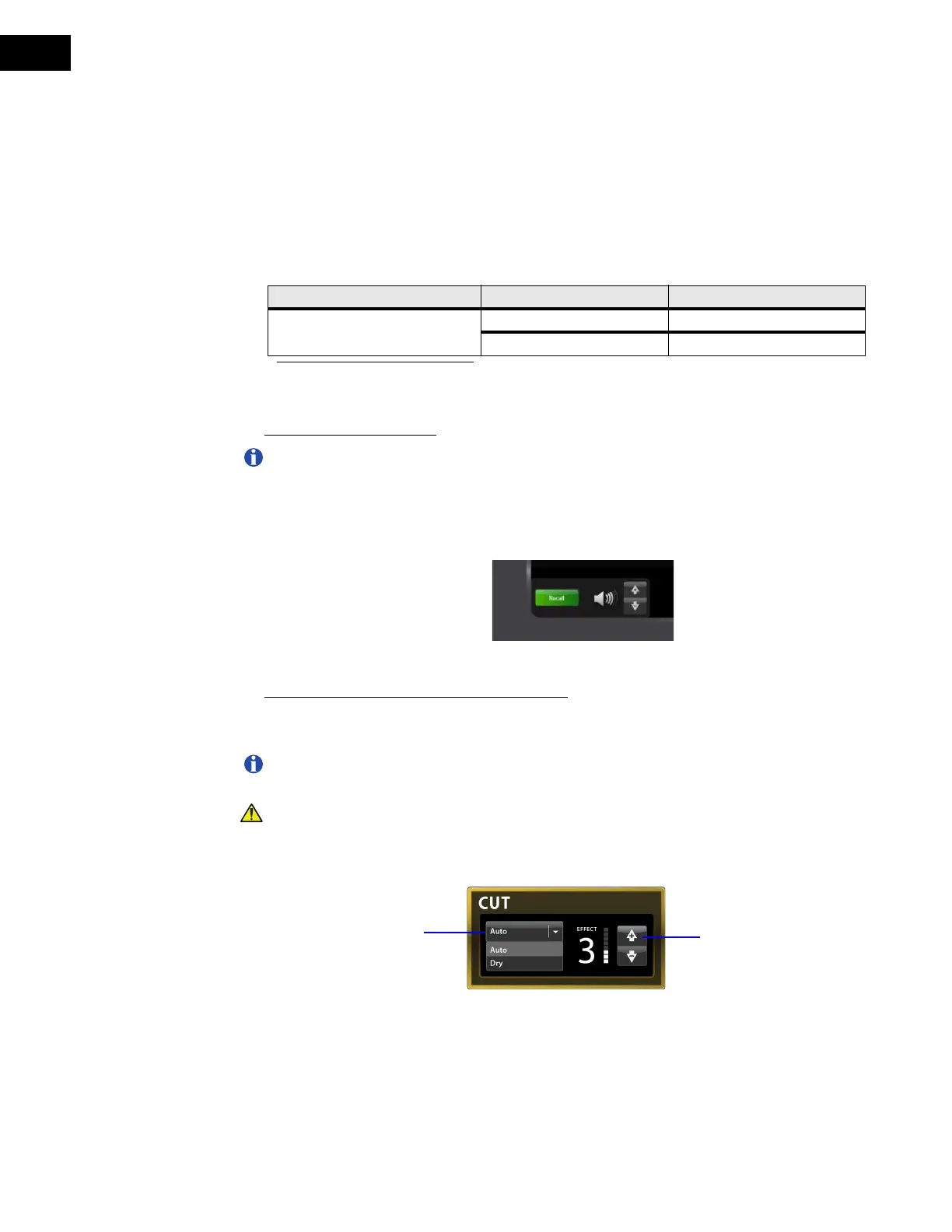
To load the previous monopolar and bipolar settings, touch the Recall button. The Recall
button disappears and the previous settings are applied. The settings can then be used or
manually adjusted as needed (Figure 8.3).
Figure 8.3 Recall button
Manually Adjust Mode and Effect Settings
Touch to select the mode from the drop-down menu. Set the desired effect using the effect
selection arrows (Figure 8.4 and Figure 8.5).
Note: The energy settings can also be adjusted from the Surgeon Console touchpad.
For more information, see the da Vinci SP System User Manual.
CAUTION: Changing settings on one monopolar instrument changes settings for all
connected monopolar instruments. Changing settings on one bipolar instrument
changes settings for all connected bipolar instruments.
Figure 8.4 Mode and effect settings, Monopolar CUT
Table 8-1 Maximum Approved Energy Settings for EndoWrist SP Instruments
ESU Mode Max Effect Setting
VIO dV
a
a. All other effect settings in all other monopolar and bipolar modes are approved for use with
EndoWrist SP instruments.
Monopolar, Swift Coag 5
Monopolar, Auto Cut 7
Mode selection
Effect selection


 To Next Page