da Vinci SP Instruments and Accessories
Using the Electrosurgical Unit (ESU) with Monopolar and Bipolar Instruments
51
DRAFT/PRE-RELEASE/CONFIDENTIAL
12/5/19
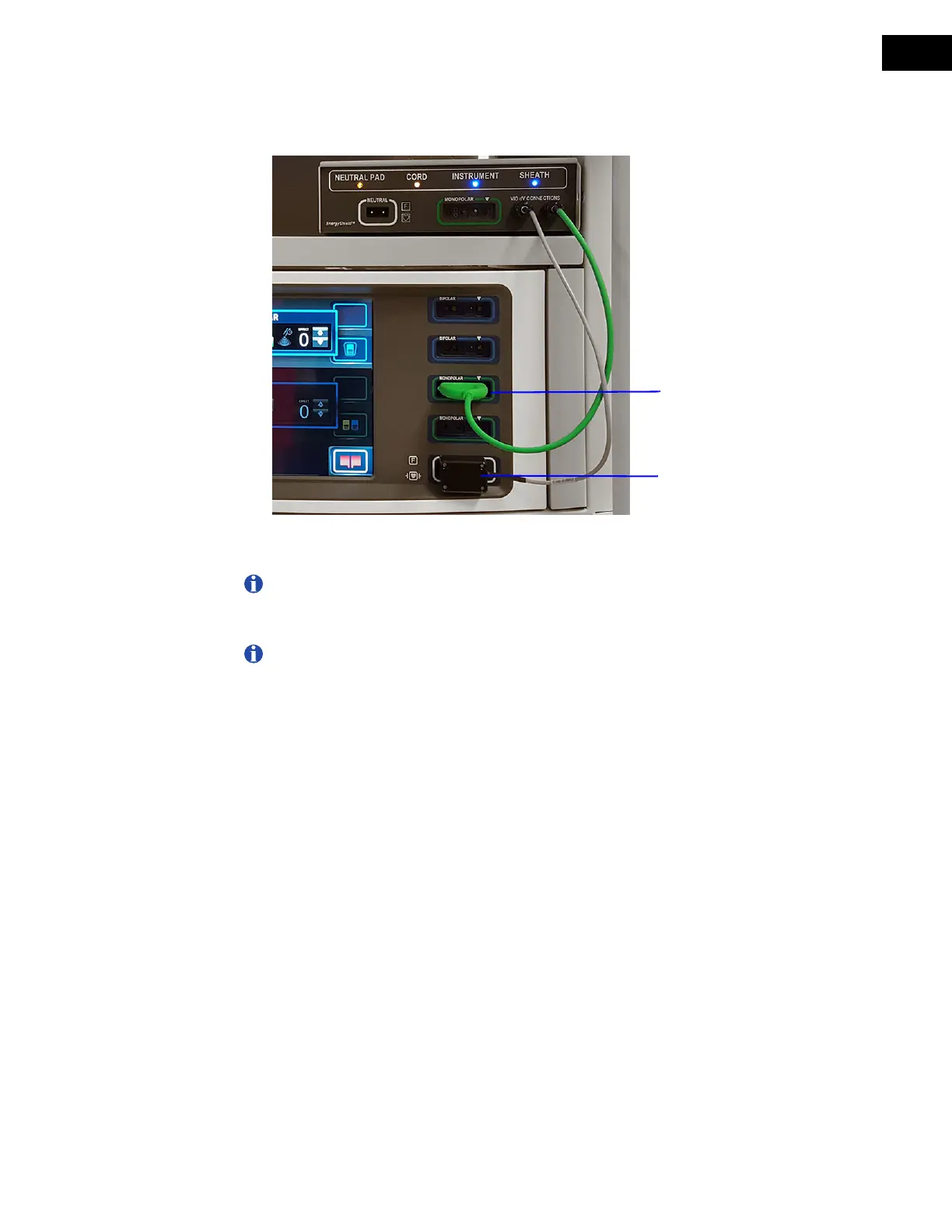
3. Verify that the neutral adapter from the EnergyShield Monitor is plugged into the neutral
port on the VIO dV (
Figure 8.10). Confirm that the connector cannot be pushed further
into the neutral port.
Figure 8.10 Check EnergyShield Monitor neutral adapter and monopolar adapter
connections to VIO dV
Note: The neutral adapter from the EnergyShield Monitor can remain plugged into
the neutral port on the VIO dV to enable use of manual instruments with the VIO dV,
even in the event of an EnergyShield Monitor fault.
Note: Only monopolar port 2 can be used for manual monopolar instruments that
are activated by the auxiliary foot pedal.
4. Verify that the monopolar adapter from the EnergyShield Monitor is plugged into a
monopolar port on the VIO dV (
Figure 8.10).
5. Remove the patient neutral pad from the package and place the pad in the preferred
location on the patient. See
Patient Neutral Pad Positioning on page 62 for more
information.
Monopolar adapter from
EnergyShield Monitor
Neutral adapter from
EnergyShield Monitor


 To Next Page