11 SETUP/MAINTENANCE
Invacare
3G Storm Series® 102 Part No 1143151
1. If necessary, remove the battery box(es) from the wheelchair. Refer to one of the following procedures:
• Removing/Installing Battery Boxes
on page 94.
• Removing/Installing the 22NF Battery Box
on page 100.
2. Disconnect battery cables. Refer to Disconnecting/Connecting Battery Cables on page 104 for either Group 24 batteries or 22NF batteries in a
single battery box.
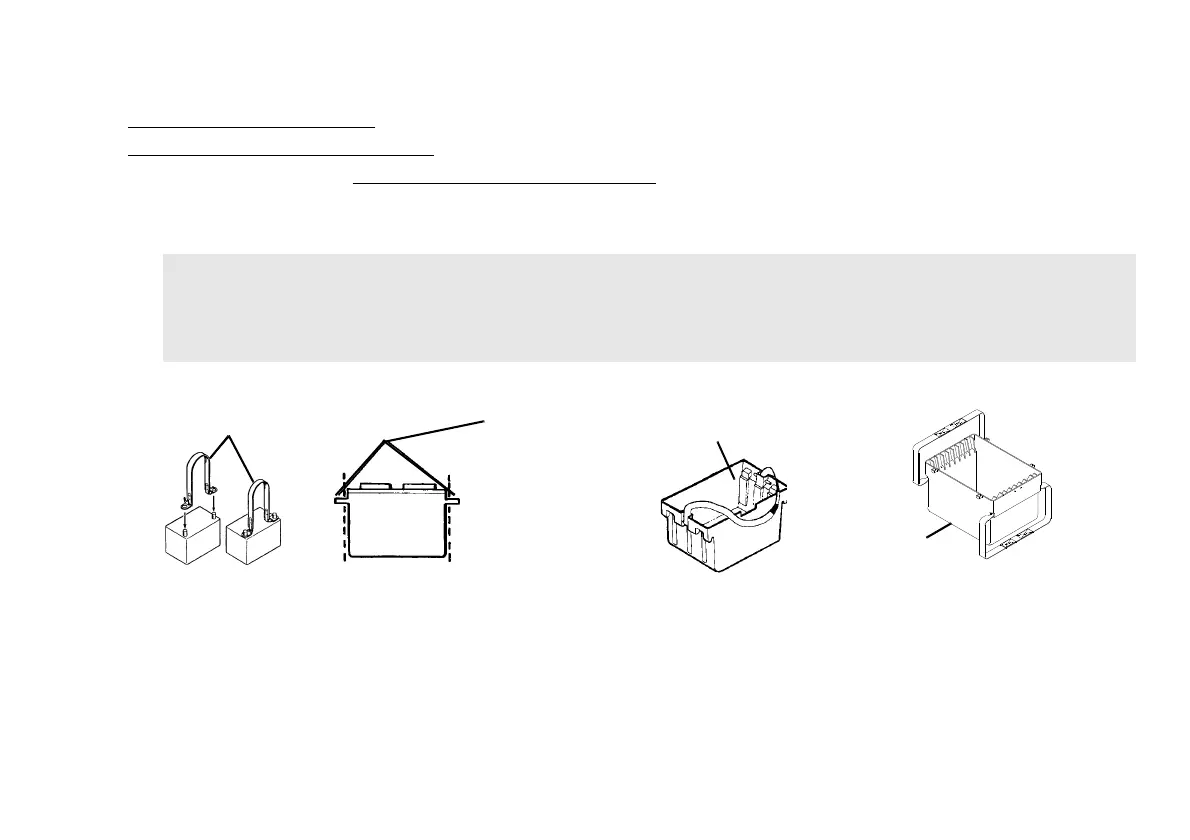
3. Secure battery lifting strap to battery terminals/posts.
4. Remove batteries from battery box(es).
.
FIGURE4 Installing/Removing Batteries Into/From Battery Boxes
CAUTION
Some battery manufacturers mold a carrying strap and/or hold down flanges directly into the battery case. Batteries which
interfere with the battery box cannot be used for these applications. Attempting to “wedge” a battery into a battery box
may damage the box and/or the battery.
Battery Lifting Strap
Molded Carrying
Straps
(These batteries
must NOT be used.)
Group 24 Battery
Box Bottom
22NF Battery Box
Bottom







 To Next Page