8 WHEELCHAIR OPERATION
Part No 1143151
59 Invacare
3G Storm Series®
STATUS
MESSAGE
This area displays status or instructions.
CLOCK Displays current time.
STATUS
INDICATOR
The status indicator will show a “Warning” (exclamation point inside a triangle) indicator when the chair has a condition that
requires attention.
The status indicator will show a “STOP” sign when a serious condition exists. The chair will not be allowed to operate.
The status indicator shows an Attendant Icon if the attendant’s override switch is active.
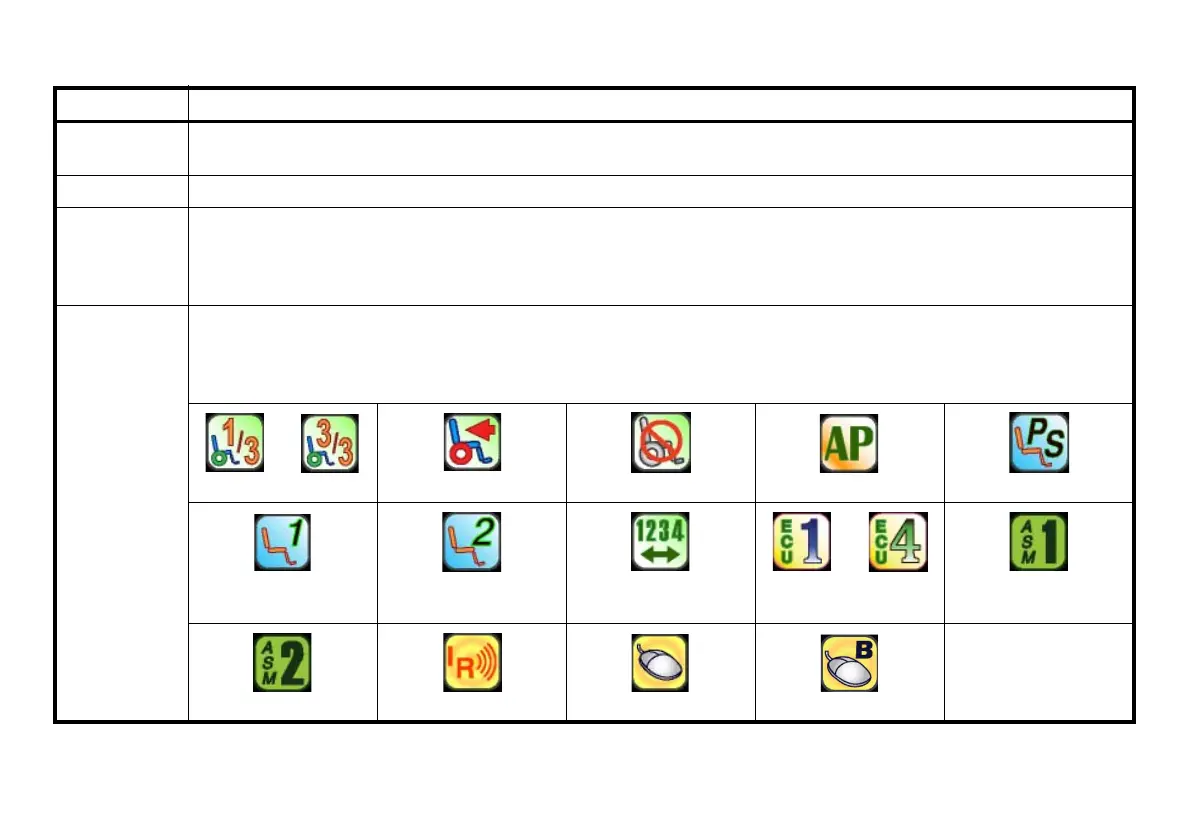
MODES The dotted-box shows the area that contains the available “modes” in the currently selected drive. The modes are programmed
for each drive and are based upon the configuration of the chair.
These modes are highlighted when the Mode is active. The operator changes modes by pressing the Mode Select Switch.
The available modes are as follows:
Digital 3 Speed 1 - 3 RIM Mode No Driving Automatic Positioning Powered Seating
4-Switch Level 1
(L1, L1 Latched)
4-Switch Level 2
(L2, L2 Latched)
Drive Select ECU Output Activated ASM 1
ASM 2 Infrared Mouse Mouse B
ITEM DESCRIPTION






 To Next Page