8 WHEELCHAIR OPERATION
Invacare
3G Storm Series® 60 Part No 1143151
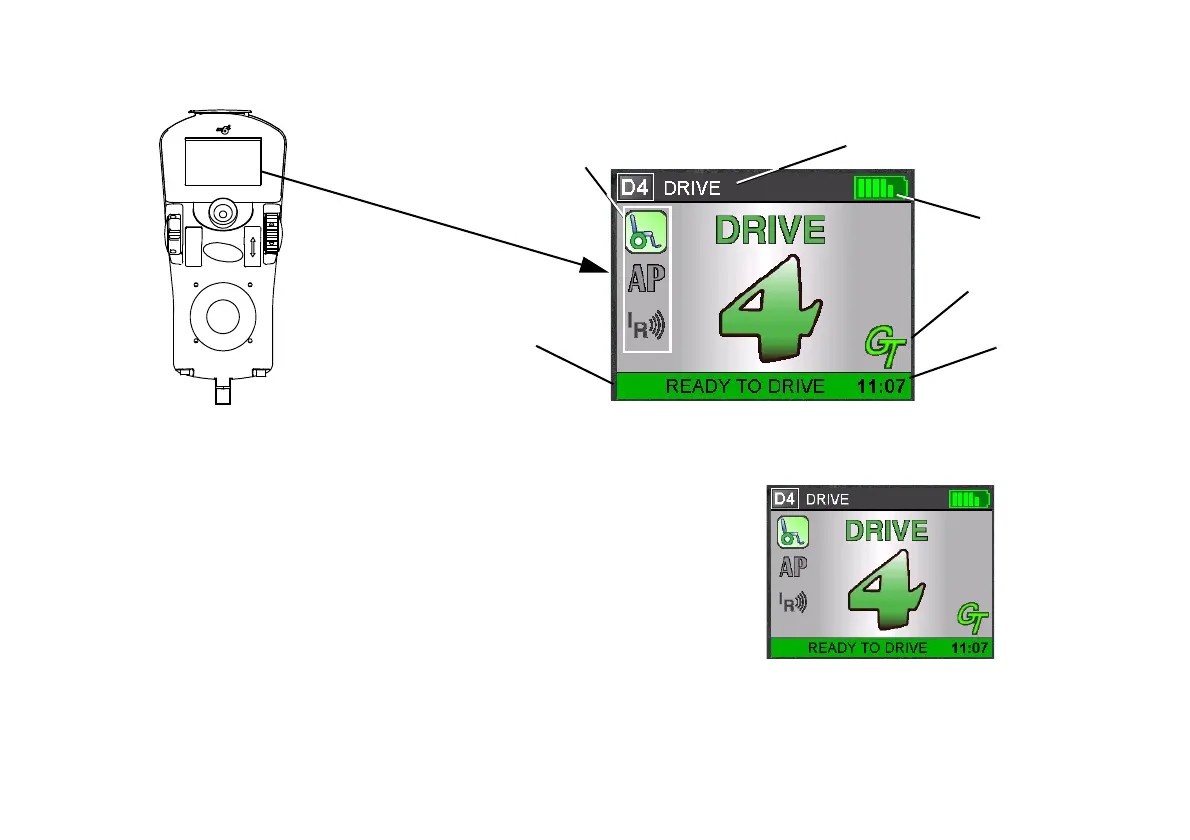
FIGURE6 LCD Display Screens - Main Screen
Driving Screen
This screen is shown when the operator issues a drive command and the
Drive Icon on the main screen was highlighted.
FIGURE7 LCD Display Screens - Driving Screen
Available Modes in this Drive
(Must be Programmed. Top, Highlighted Icon
Indicates Selected Mode)
Clock
Battery Gauge
Display
Status/Info Message Area
Status Indicator
Drive Profile Name
For this procedure, refer to FIGURE7.
The Drive’s name, warning/info message, status
icon and battery indicator are displayed on this
screen.







 To Next Page