EasyManua.ls Logo

Invacare G5510 - User Manual

Invacare G5510
68 pages
Print Icon
To Next Page IconTo Next Page
Loading...
User Manual
This manual MUST be given to the user of the product.
BEFORE using this product, read this manual and save for future reference.If you are unable to
understand the warnings, cautions or instructions, contact a healthcare professional, dealer or
technical personnel before attempting to use this equipment
EN
For more information regarding bed rail safety, refer to the Bed Rail
Entrapment Risk Notification Guide at www.invacare.com.
Invacare
®
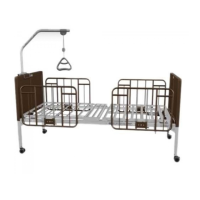
G5510 Bed
Full Electric Bed
IMPORTANT SAFETY INSTRUCTIONS
SAVE THESE INSTRUCTIONS

Questions and Answers

  • G
    Gregory MeltonJul 31, 2025
    What to do if Invacare G5510 electric functions do not move?
    • U
      urodriguezJul 31, 2025
      If the electric functions of your Invacare Medical Equipment aren't working, here are a few things to check: * Ensure the power cord is properly plugged into a functioning power source. * Make sure the pendant cable isn't tangled or pinched. * Check that the cables are free from entanglement or pinching. * Also, verify that you haven't reached the end of the stroke; if so, try operating the opposite button. * Finally, inspect your household fuse or breaker box to rule out a blown fuse or tripped breaker.
  • L
    Lisa DixonAug 5, 2025
    What to do if Invacare Medical Equipment bed section does not stop moving?
    • J
      Joan BallAug 5, 2025
      If a section of your Invacare Medical Equipment bed won't stop moving, check the pendant for depressed or stuck buttons. If a button is stuck, you should call your dealer for repair assistance.
  • M
    Melissa SpencerAug 9, 2025
    What to do if Invacare G5510 bed Hi/Lo movement does not stop?
    • D
      Dawn MyersAug 9, 2025
      If the Hi/Lo movement on your Invacare Medical Equipment bed won't stop, inspect the cables for damage. If the cables are damaged, replace them. If the cables are ok, call your dealer.
  • C
    Cindy CookAug 14, 2025
    Why Invacare G5510 bed section does not move?
    • H
      Heather CastroAug 14, 2025
      If a section of your Invacare Medical Equipment bed isn't moving, the thermal protection may be activated. Allow the bed unit to sit for up to 30 minutes, and then try again. Also, ensure cables are not entangled or pinched.
  • Y
    yayalaAug 18, 2025
    What to do if Invacare G5510 Medical Equipment bed does not stay in place?
    • D
      David WebsterAug 18, 2025
      If your Invacare Medical Equipment bed isn't staying in place, make sure the casters are locked. If the casters are locked and the bed still moves, call your dealer.
  • B
    Brian AndradeAug 22, 2025
    What to do if Invacare G5510 is producing unusual sounds?
    • C
      Carla StanleyAug 22, 2025
      If your Invacare Medical Equipment bed is making unusual sounds, emitting burning odors, or showing movement deviations, unplug the power cord from the wall and call your dealer.
  • C
    Cindy BrownAug 27, 2025
    Why intermittent motor operation on Invacare G5510 Medical Equipment?
    • J
      jake08Aug 27, 2025
      If you're experiencing intermittent motor operation with your Invacare Medical Equipment, allow a slight pause between adjustments. Avoid pressing multiple buttons at the same time.

Summary

General Information

Symbols

Signal words used in the manual for hazards and unsafe practices.

Symbols Used on Bed

Various symbols used on the bed and their meanings.

Limited Warranty

Details of the warranty terms, limitations, and exclusions.

Product Overview

Label Locations

Identifies the location of various labels and warnings on the bed.

Specifications

Technical details and dimensions of the Invacare G5510 Bed.

Accessories and Accessory Weight

Lists tested accessories and their respective weights.

Safety

General Guidelines

Essential safety information and warnings for using the Invacare G5510 Bed.

Pendant Operation

Safety precautions related to the pendant and its operation.

Weight Limitations

Crucial information on maximum weight capacities for occupant and total load.

Operation

Bed Operation and Component Overview

Identifies the main components of the bed and their functions.

Operating the Bed

Instructions on how to raise/lower the entire bed and sections.

Using the Emergency Crank

Steps to manually adjust the bed during power outages or malfunctions.

Dealer Section - Packaging, Handling, and Set-Up

Unpacking and Handling

Warnings and instructions for safely unpacking and handling the bed.

Assembling the Bed Ends

Steps for installing the casters and bed ends onto the bed frame.

Electrical Connections

Details on connecting electrical components like pendant and power supply.

Troubleshooting;Maintenance

Troubleshooting Electrical

Common electrical issues and their solutions for users and dealers.

Troubleshooting Mechanical

Common mechanical issues and their solutions for users and dealers.

Maintenance Checklist

A checklist for performing regular mechanical and electrical inspections.

Invacare G5510 Specifications

General IconGeneral
CategoryMedical Equipment
Weight Capacity450 lbs
ModelG5510
Mattress IncludedNo
Adjustable HeightYes
Head Section AdjustmentYes
Knee Section AdjustmentYes
Trendelenburg/Reverse TrendelenburgNo
Side RailsOptional
Wheels/CastersYes
Power Requirements120V AC
Bed TypeFull Electric
Product TypeHospital Bed
Bed Width35 inches
Bed Length88 inches

Related product manuals