3Setup
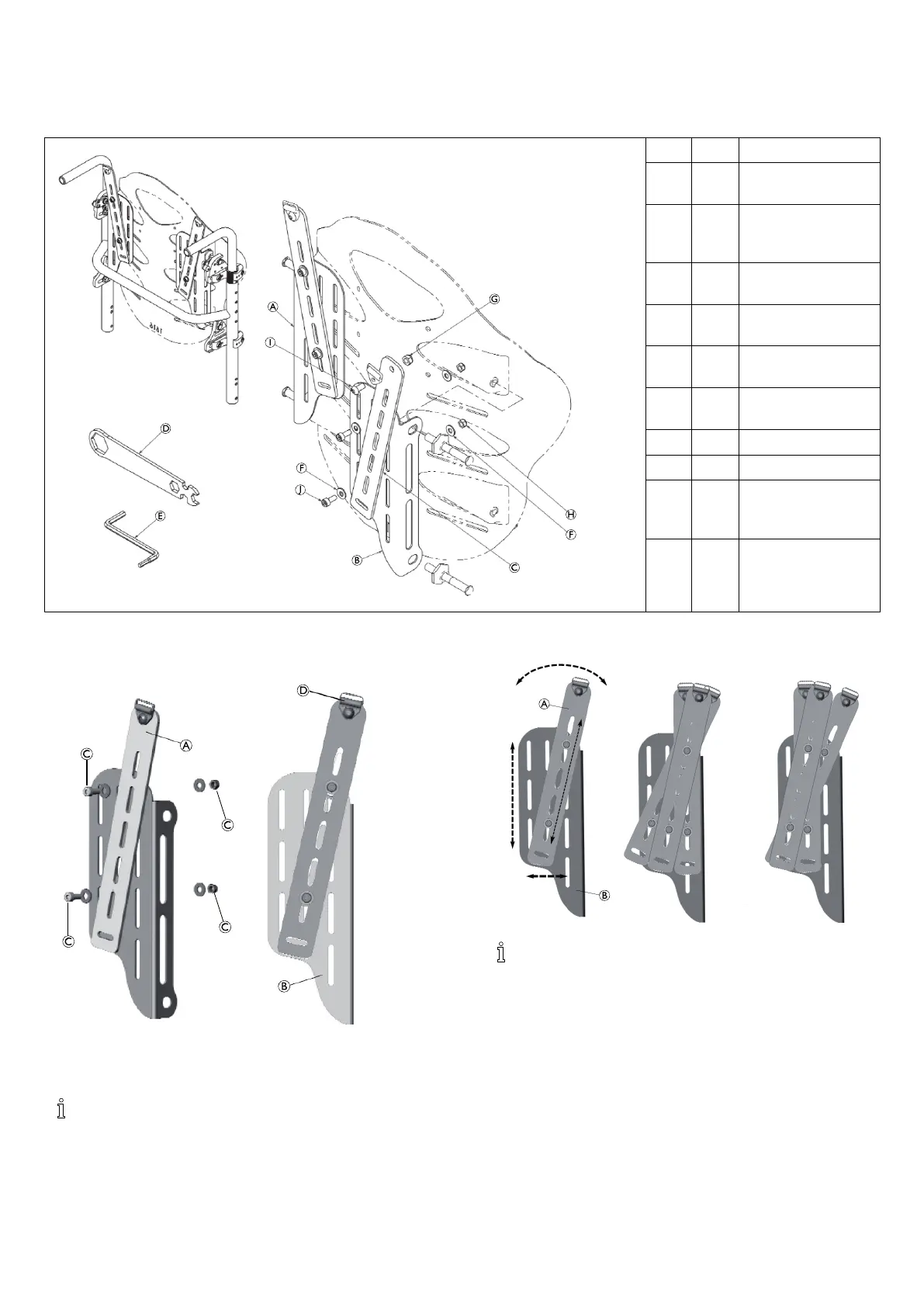
3.1InstallationOverview(Matrx®EliteBacks)
Pos.
Qty.
Description
A
1SupportHarness
MountingBracket,left
B
1SupportHarness
MountingBracket,
right
C
2SupportHarness
ExtensionBracket
D
1
Multiwrench,
universal
E
1
Multi-metricHexkey,
4mm/5mm
F
84.8mmFlatwasher,
SAE,BZ
G
2M6Nylocnut,BZ
H
4M5Nylocnut,BZ
I
2M61.0x12mm
Buttonsocketcap,
alloysteel,BZ
J
4
M50.8x12mm
Socketheadcap,alloy
steel,BZ
3.1.1InstallingtheSupportHarnessMounting
Bracket(Matrx®Elite)
(RightExtensionBracketassemblyshown)
1.Ifapplicable,removetheexistingmountingpins(x4)andflange
nuts(x4)fromtheMatrxEliteBackShell(retainhardware).
Foreaseofinstallation,werecommendinstallingthe
extensionbracketontothemountingplatepriortosecuring
theentireassemblyontothebackshell.
Usethevariousmountingslotstoachievethedesiredangle
andheightoftheextensionbracket.
2.LooselyinstalltheextensionbracketAontothemountingplate
Binthedesiredpositionusingbolts,washers,andnutsC.
Tohelppre-determinethemountingpositionofthe
extensionbracket,alignthemountingplatewiththeback
shellandpositiontheextensionbracketontheplateto
determinewhichslots/mountinghardwarelocationswill
producethedesiredposition.
1589332-A3












 To Next Page