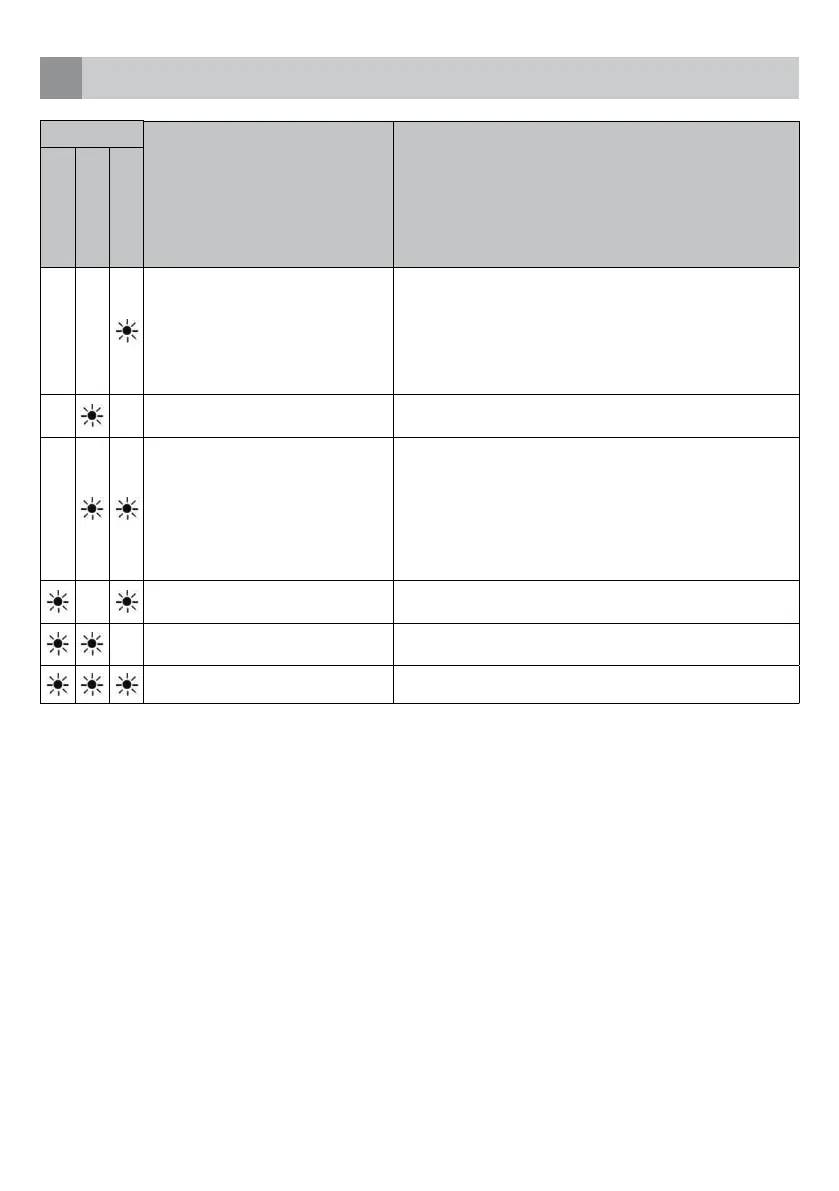
FAULTCODE DESCRIPTION CHECK
Wash
Ready
Start/Pause
Inadequate water supply. • Check whether the tap is fully open and there nothing blocking
the
water mains.
• Close the tap, remove the input hose and check whether it is
clogged.
• Start the dishwasher again. Contact the service department of
Inventum when the error remains.
Water supply is not stopping. • Close the tap.
• Contact the service department of Inventum.
The waste water can not be discharged. • The water discharge hose is clogged.
• The filters might be clogged.
• Turn the dishwasher off. Reset the dishwasher’s program and
check
the filters and the discharge hose.
Restart the dishwasher.
• Contact the service department of Inventum when the error
remains.
The water temperature is not correct.
Heating defect.
• Contact the service department of Inventum.
Safety is activated against water
overflow.
• Turn off the dishwasher and close the tap.
• Contact the service department of Inventum.
Faulty electronics. • Contact the service department of Inventum.
troubleshooting
8
English • 37



 To Next Page