21
For rack mounting, please note that the enclosure may be equipped with a built-in fan, or warm air can be easily
removed. The device must be screwed firmly into the rack t slip during transport.
Now connect the power supply to the "SHOWControl" and then to the power supply.
2.3 Creation of a DMX-Chain:
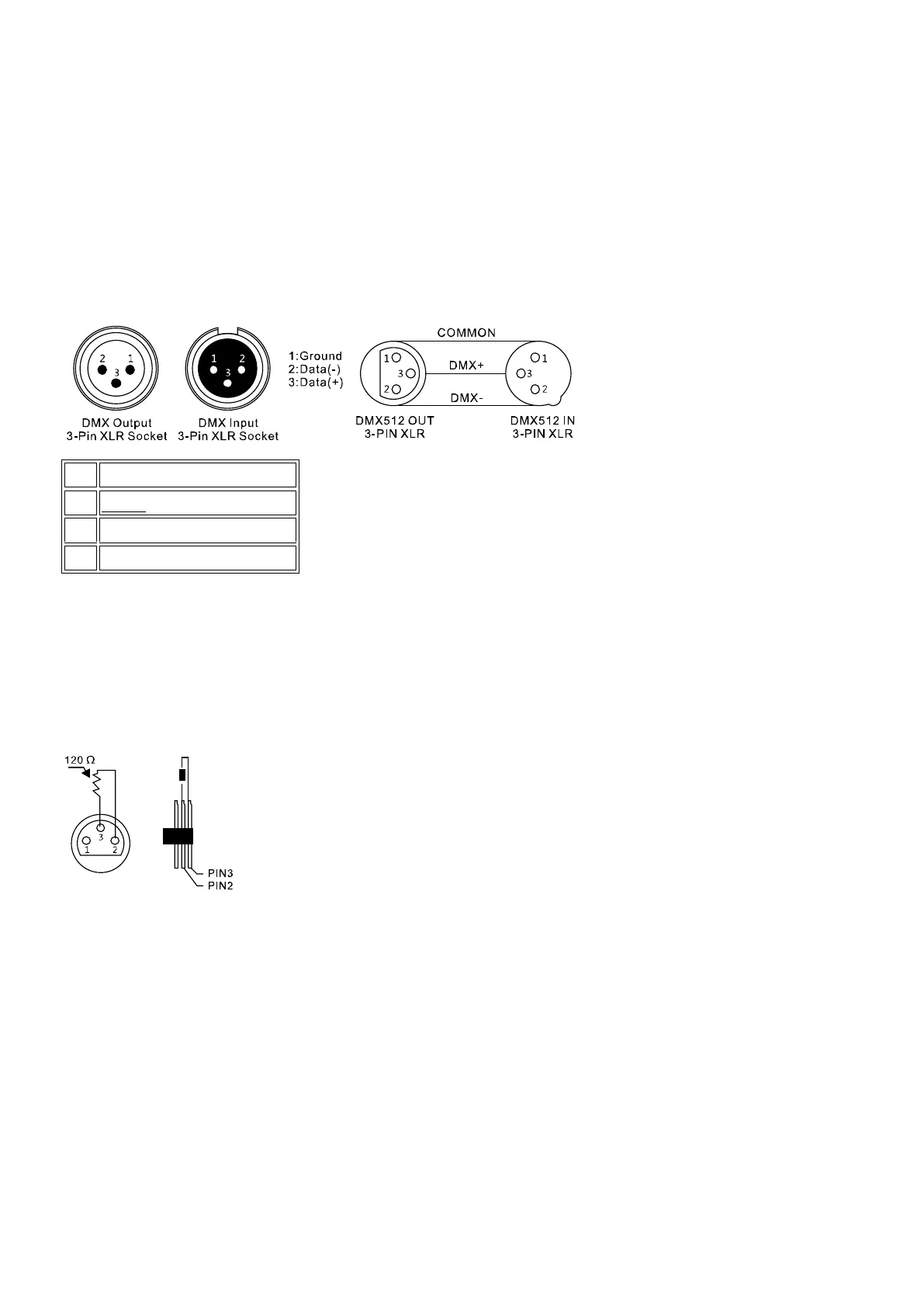
DMX is the abbreviation for digital multiplex and allows the digital control of several DMX devices via a common
control cable.
The connections between "LIGHTControl" and the devices must be made with 2-pin, shielded cables (DMX cable).
Microphone cables are not suitable for the transmission of DMX digital signals. 3-pin XLR connectors and
couplings are used as a connection.
A three-pin XLR socket serves as a DMX output, a three-pin XLR connector serves as a DMX input.
Connect the DMX input of the unit to the DMX output of a DMX controller or other DMX device. Connect the output
of the first DMX device to the input of the second and so on to form a series circuit
From a cable length of 300m or after 32 connected DMX devices, the signal should be amplified using a DMX
splitter / repeater (e.g., Involight DMXS4, DMXS6 or DMXS8) to ensure error-free data transmission.
IMPORTANT: A terminating resistor should be connected to the end of the chain at the last device in a DMX chain.
DMX end resistors are commercially available, but can also be built by themselves. A 120 Ohm resistor must be
soldered in an XLR connector between the two poles (+ and -).
2.4 Configuration:
Note: Basic knowledge is required for the DMX-512 standard!
2.4.1 Menu structure:
After switching on, the device first performs a short self test. The device then automatically switches to "MANUAL"
mode and is ready for operation.
1. To enter the menu settings, hold down the / MENU / key for 2 seconds. The display shows the first menu item
"01.Patch fixture".
2. Use the Pan wheel to navigate through the menu.
3. To enter the desired menu item, press / ENTER / -Key.
4. Use the Pan wheel to change the current settings and confirm with ENTER.
5. To cancel the setting process, briefly press the / ESC / -Key.
6. To exit the system settings and save your settings, press and hold the / MENU / -Key again for 2 seconds.



 To Next Page