20
Keyboard Emulation
Console keyboard port emulation/bypass feature supports most gaming/multimedia
keyboards. The default setting is enabled. To disable:
1. Invoke HSM
2. Press [N]
This procedure is a toggle. Repeat Step 1 and 2 to enable Keyboard Emulation
Note: When keyboard emulation is disabled, the [M], [W], [F2], [F3], [F4], [F5], [F6], and
[F10] are also disabled
SPC Mode
To set the keyboard/mouse to use SPC mode so that it can work under special operating
systems as a standard (104 key) keyboard/mouse:
1. Invoke HSM
2. Press [F1]
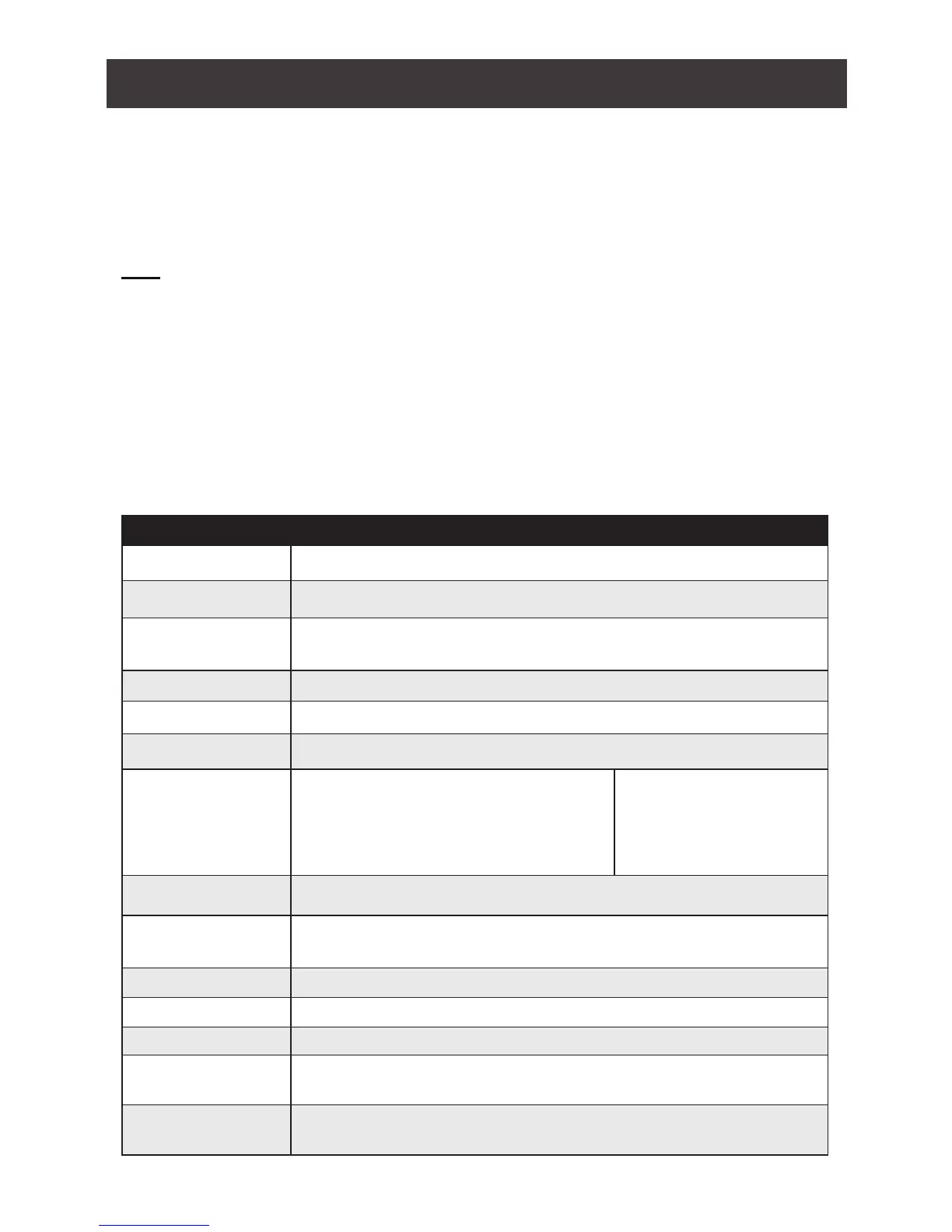
Hotkey Settings Mode Summary Table
Key Function
[B] Enables/Disables the buzzer.
[E] Enables/Disables Power ON Detection feature.
[F1] Allows the keyboard and mouse to work under special operating
systems as a standard (104 key) keyboard/mouse
[F2] Enables Mac keyboard emulation.
[F4] Lists current switch settings via Paste function of a text editor.
[F5] Performs a reset on all USB devices.
[F6][nn][Enter] Sets the keyboard language
Note: nn is a two-digit number that
represents one of the following keyboard
language code:
- US English:33
- French:08
- Japanese:15
- German: 09
[F10] Automatically detects and sets the keyboard operating platform.
[H] Toggles between the default ([Num Lock] [-]) and alternate ([Ctrl][F12])
combination
[M] Enables/Disables mouse emulation.
[N] Enables/Disables Keyboard emulation
[R][Enter] Resets the hotkey settings to their default statuses
[S] Toggles between the default and alternate manual port selection
pushbutton settings.
[T] Toggles between the default port switching keys ([Scroll Lock] [Scroll
Lock]) and alternate ([Ctrl][Ctrl]).



 To Next Page