25
Specication
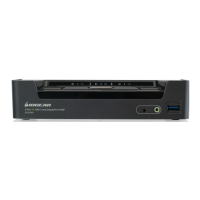
Function GCS1902 GCS1904
Connections Computer 2 4
Console 1
Port Selection Pushbuttons, Hotkey, Mouse*
Connectors Console
Ports
Keyboard 1 x USB Type A (Black)
Video 1 x DisplayPort (White)
Mouse 1 x USB Type A (Black)
Speakers 1 x 3.5 mm Mini Stereo Jack (Green; Front)
1 x 3.5 mm Mini Stereo Jack (Green; Rear)
KVM
Ports
KB / Mouse 2 x USB 3.0 Type B (Blue) 4 x USB 3.0 Type B (Blue)
Video 2 x DisplayPort (Black) 4 x DisplayPort (Black)
Speakers 2 x 3.5 mm Mini Stereo
Jack (Green)
4 x 3.5 mm Mini Stereo Jack
(Green)
USB Hub 1 x USB 3.0 Type A (Blue; Front)
1 x USB 3.0 Type A (Blue; Rear)
Power 1 x DC 5V Jack
Switches Selected 2 x Pushbutton 4 x Pushbutton
LED On Line / Selected 2 (Orange) 4 (Orange)
USB Link 2 (Green) 4 (Green)
Emulation Keyboard / Mouse USB
Video 3840x2160 @ 30 Hz;
2560x1600 @ 60 Hz
Scan Interval 1–99 secs (5 secs. default)
Power Consumption DC 5 V
Environment Operating Temp. 0–50° C
Storage Temp. -20-60° C
Humidity 0–80% RH, Non-condensing
Physical
Properties
Housing Metal
Weight 1.46lb 1.9lb
Dimensions (L x W x H) 7.8” x 1.7” x 2.9” 10.3” x 1.7” x 2.9”
*Port switching works only with a 3-key USB mouse wheel in emulation mode.



 To Next Page